

Build a Purchase Order Form That Arrives Complete
Create a purchase order form that prices every line, stamps each order with a PO number, and keeps all orders in one table.
Build a purchase order form for my business.
Trusted by Builders Worldwide
Active Builders Worldwide
Apps Successfully Created
Countries Globally Reached



What the Form Does Before the Vendor Sees It
A blank template leaves the math and the numbering to whoever fills it in. These six pieces take both off their desk.
Line totals that add up as you type
Multiply quantity by unit price on every line, then add tax and freight to a running total. The requester sees the full amount before submitting, and nobody re-adds the column.
PO numbers issued in sequence
Stamp each submitted order with the next number in your series. Accounts payable finds the order from the reference on a vendor invoice instead of searching old email threads.
A vendor list with saved details
Pick the vendor from a dropdown, and its address and payment terms fill in. Add a supplier once, and every later order pulls the same details instead of asking for them again.
Delivery date and drop-off point
Ask for the date the goods are needed and the dock or room they go to. Receiving knows what is due and where, and the vendor reads both on the order before anything ships.
A clean PDF for every order
Generate a PDF of each submitted order with your logo and billing details at the top. Send it to the vendor by email, or print it on letter paper for suppliers who keep paper files.
Code you can take anywhere
Export the full codebase to your GitHub on paid plans when you want the form wired into your ERP or hosted on your own servers. Every line of the form and the orders table is yours.
How Buyers and Suppliers Put It to Work
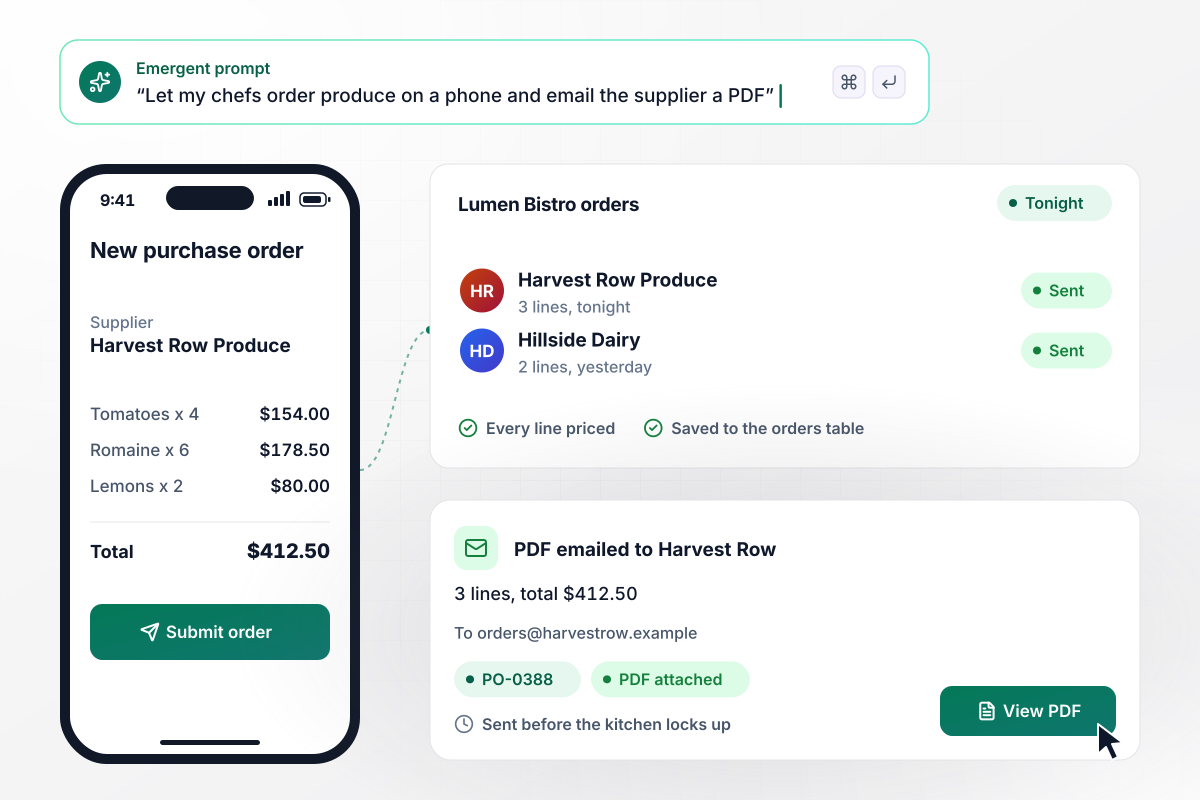
Produce ordered by phone reaches the supplier as a PDF
Ten minutes before close, the sous chef at Lumen Bistro opens the purchase order form on a phone. She adds 4 cases of Roma tomatoes, 6 of romaine and 2 of lemons, and each line prices itself. The order comes to $412.50. Harvest Row Produce gets it as a PDF in its inbox before the kitchen locks up.
window.awbMockup = { restaurantKitchens: "I run the kitchen at Lumen Bistro. Build a purchase order form my chefs fill on a phone at close: pick the supplier, add lines with item, cases and price per case, and show the running total. When they submit, email the supplier a PDF of the order and save it to a table I can check each morning.", schoolDistricts: "I handle purchasing for Cedar Hills School District. Build one purchase order form for teachers. The budget code dropdown should show only the codes for the teacher's department. If the total is over $1,000, require a vendor quote upload before the form can be submitted, and keep anything without one as a draft.", factoryBuyers: "I buy raw materials for Kessler Fabrication. Build a purchase order form with our vendor list, line items and a ship-to dock. Give each order the next PO number, add the vendor's payment terms, and email the vendor a PDF with a link to confirm the ship date. Show the confirmed date in the orders table.", supplierIntake: "My company is Oakes Packaging, a box supplier for bakeries, cafes, and grocers. Build a form where business customers send us their purchase orders. Require their PO number, a ship-to address, and the number of cases for each box size. Post every new order to our #orders Slack channel with the PO number first." };
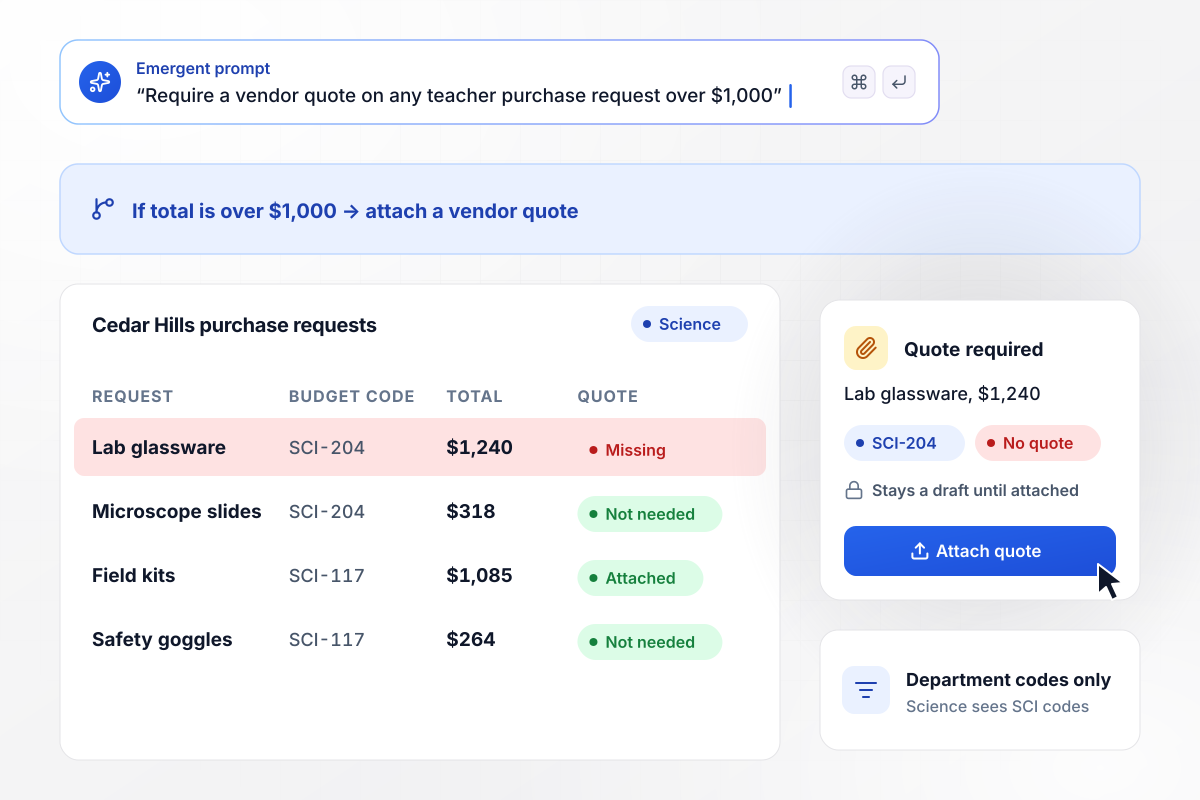
Quotes required on any request over $1,000
Cedar Hills School District gives every teacher one purchase order form. The budget code dropdown lists only the codes for that teacher's department. Any request over $1,000 needs a vendor quote attached before it can be sent. A $1,240 order for lab glassware stays a draft until the quote is there.
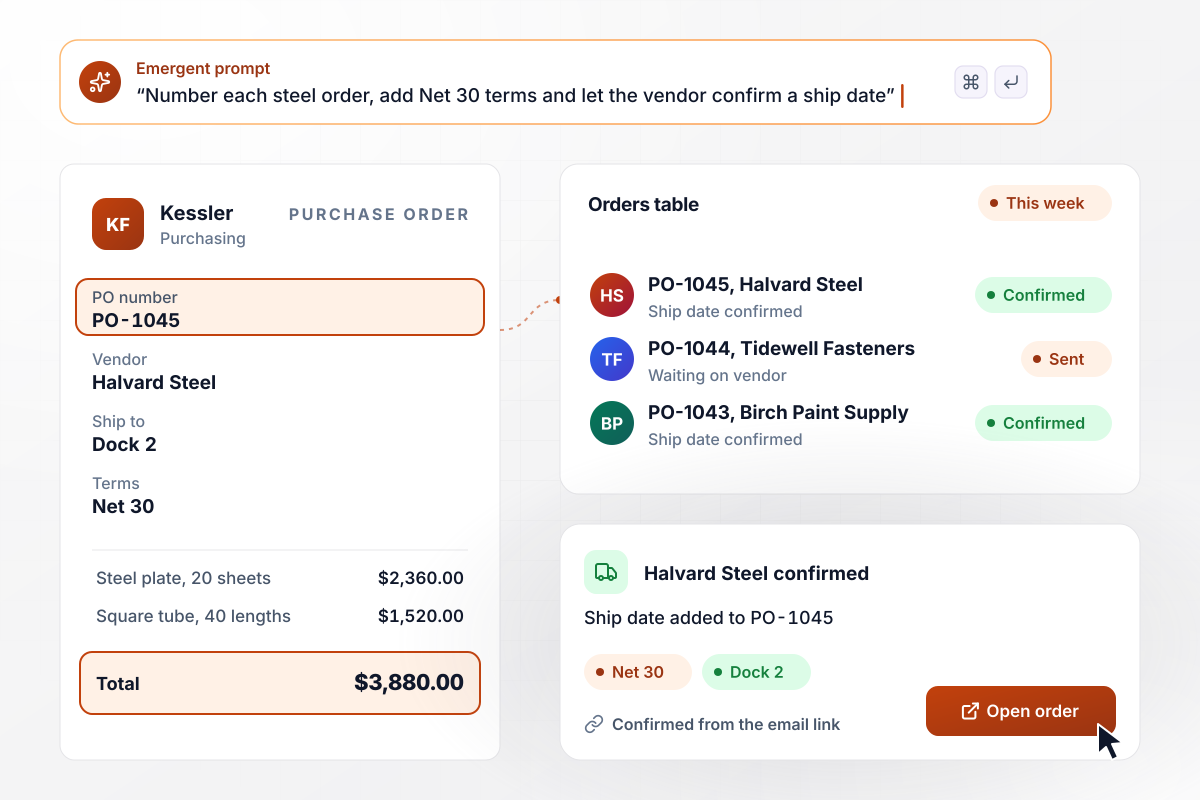
Each PO gets its number before it leaves
The buyer at Kessler Fabrication orders 20 sheets of steel plate and 40 lengths of square tube from Halvard Steel. On submit, the form stamps the next number, PO-1045, with Net 30 terms and Dock 2 as the ship-to. Halvard confirms a ship date from the link in its email. The date lands in the row for the $3,880 order.
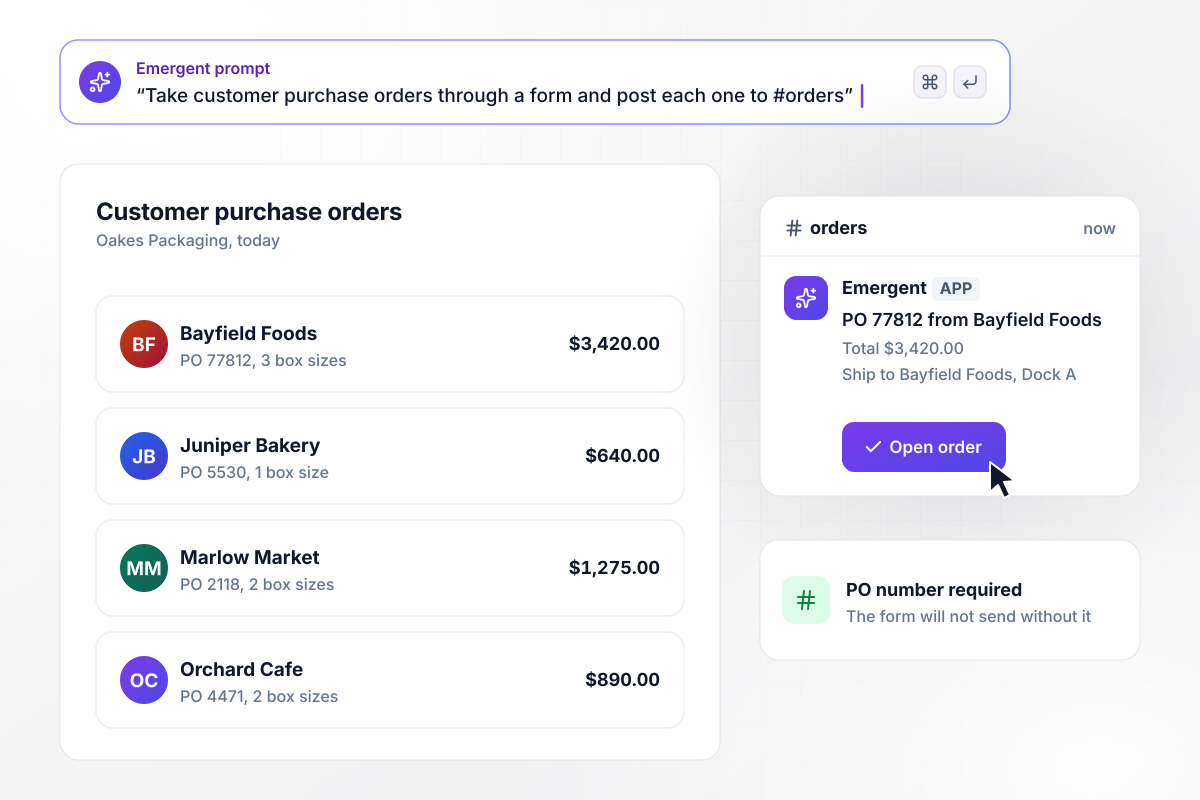
Customer POs land in #orders with their number
Business customers of Oakes Packaging send their own purchase orders through one form. The customer's PO number is required, along with a ship-to address and the cases of each box size. Bayfield Foods submits PO 77812 for $3,420, and it posts to #orders in Slack with the PO number on the first line.






How to Create a Purchase Order Form
Seven steps to plan the fields and numbering of a purchase order form, then build it with Emergent.
Pull up the last few emails where a supplier wrote back with a question about an order. Missing ship-to addresses and unclear units are the usual gaps. Each gap becomes a required field on the form.
Pick a prefix and a starting number, such as PO-1001, and check it will not collide with numbers already in your accounting system. Sequential numbers make any order easy to trace from the reference on an invoice.
Copy the vendor list from a spreadsheet, one supplier per row with its remit-to address and terms. Requesters choose a name instead of typing one, which keeps a single vendor from showing up under several spellings.
Choose the columns each line needs. Most orders need an item name, a quantity, and a unit price. Add tax and freight rows below the lines if your vendors charge them, and mark which columns are required.
Write one prompt with your fields and numbering rule in plain English, and attach the vendor list. Emergent builds the form and a purchase orders table behind it. Change anything later by asking, such as a required quote above a set amount.
Decide whether the vendor gets a PDF attachment, a link to confirm the ship date, or both. Put your billing address and terms on the PDF, and send a copy to whoever pays the invoices.
Submit a test order on a phone with an awkward quantity, such as 7 cases at $12.35. Check that total by hand once. Then confirm the PO number and the table row match what you entered.
Why Build Purchase Order Forms With Emergent?
A downloaded template is an empty grid. Someone still checks the math by hand and tracks which PO number comes next.

|
Jotform | Typeform | Google Forms | |
|---|---|---|---|---|
| How you build | Describe it in plain English | Templates, editor, AI generator | Templates, editor, AI assist | Editor, with Gemini drafting on some Workspace plans |
| Where responses live | A database table you own, plus any integration | Jotform account | Typeform account | Google Sheets |
| Response limits | No response caps | Monthly submission caps by plan; the form stops at the cap | Monthly response caps by plan; the form closes at the cap | No limit |
| Code ownership | Full code export to GitHub on paid plans | None | None | None |




Pick the Pricing Plan That Works for You
Choose the plan that fits your building ambitions. From weekend projects to enterprise applications, we've got you covered.




Find the right form
for whatever you're collecting















Frequently Asked Questions
Your Questions, Answered
Don't change this element unless you know what you are doing
More things you can build
with Emergent









on Emergent today


