

Build Expense Report Automation That Follows Your Policy
Build expense report automation that turns receipt photos into report lines and sends each report to the right approver.
Build expense report automation for my field sales team that checks each report against my travel policy.
Trusted by Builders Worldwide
Active Builders Worldwide
Apps Successfully Created
Countries Globally Reached



What Runs Between the Receipt and the Approval
Each report is checked against your policy before an approver opens it. Emergent builds the whole flow from a plain-English prompt.
Receipt photos turn into report lines
The app reads the merchant and total from a photo or an emailed PDF and adds the line to the open report, dated and categorized. A faded total waits for the employee to confirm.
Your policy, written as rules
Type the limits as your handbook states them: a nightly hotel cap, a meal limit per person, receipts above an amount you pick. A line that breaks one asks for a reason.
Approvers chosen by amount and team
Small reports stop at the employee's manager, larger ones add finance, and a department head can join for their team's spend. Describe a new order to change the chain.
Decisions from Slack or email
Approvers see the total, the flagged lines, and the receipts in a Slack or email message and decide there. A report left waiting sends a reminder, then escalates to a backup.
Connected to the systems you already run
The app reads your employee and manager list from the HR system and posts approved reports to QuickBooks, Xero, or NetSuite. Any other tool with an API connects too.
Records you keep, approvers you add freely
Every report and its approvals live in a database you own. There are no per-approver seats to count, and paid plans export the full code to your GitHub repository on request.
Four Stops Between Receipt and Approval
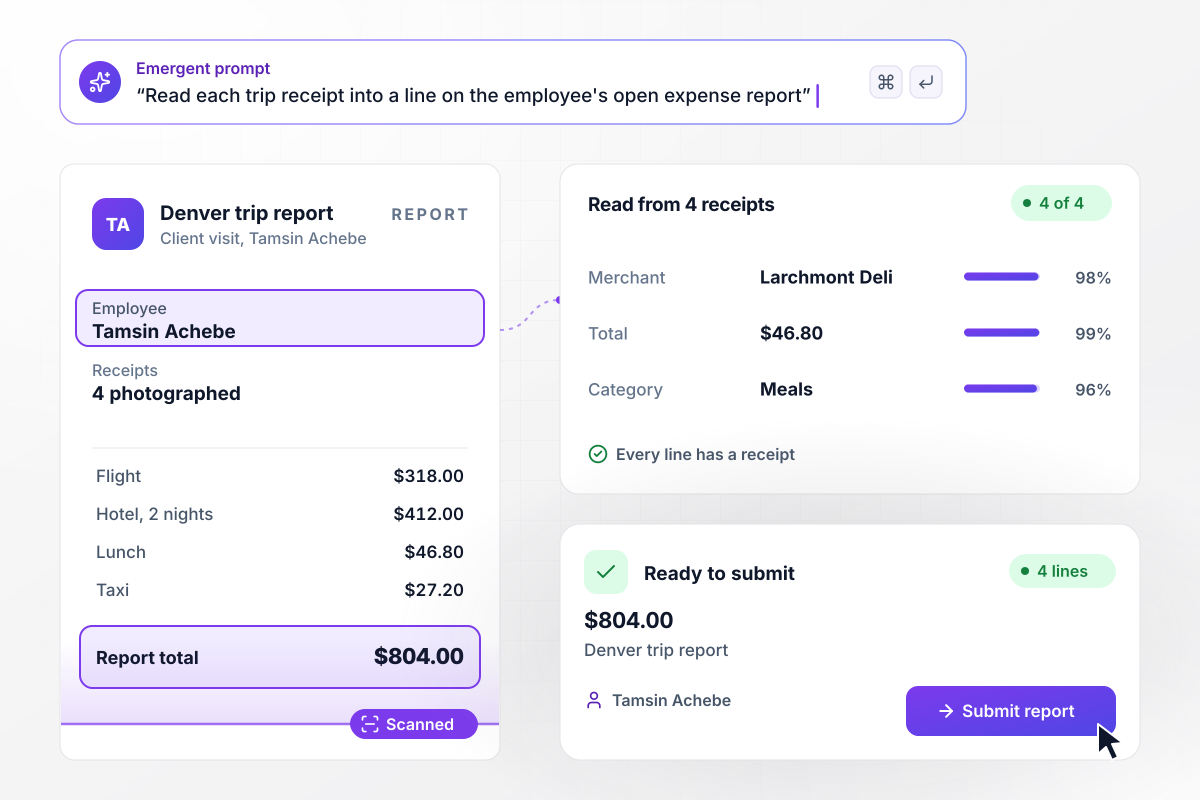
Every Denver receipt lands on one trip report
Tamsin Achebe photographs 4 receipts on a client trip to Denver. The app reads each one into a line on her trip report: a $318.00 flight, $412.00 for 2 hotel nights, a $46.80 lunch, and a $27.20 taxi. The report totals $804.00 and is ready to submit.
window.awbMockup = { tripReports: "Build trip expense reports for my consulting firm. When an employee photographs a receipt, read the merchant, the date, the total, and the category, and add it as a line on their open trip report. Show the running total, and let them submit the report once every line has a receipt.", policyChecks: "Add policy checks to our expense reports. Client dinners are capped at $75 per person, so ask how many people were at each dinner and divide the total. If a dinner is over the limit, flag the line and hold the report until the employee writes a note explaining why.", approvalRouting: "Route submitted expense reports for approval. Send each report to the employee's manager in Slack first. If the total is over $1,000, send it next to our finance lead, Marguerite Sato, as a direct message. If an approver has not answered in 2 days, send them a reminder.", accountingSync: "When an expense report is fully approved, sync it to QuickBooks as one entry, coded by the category on each line. Build a dashboard for our finance lead that shows this month's approved spend by department, and update it every time a report is approved." };
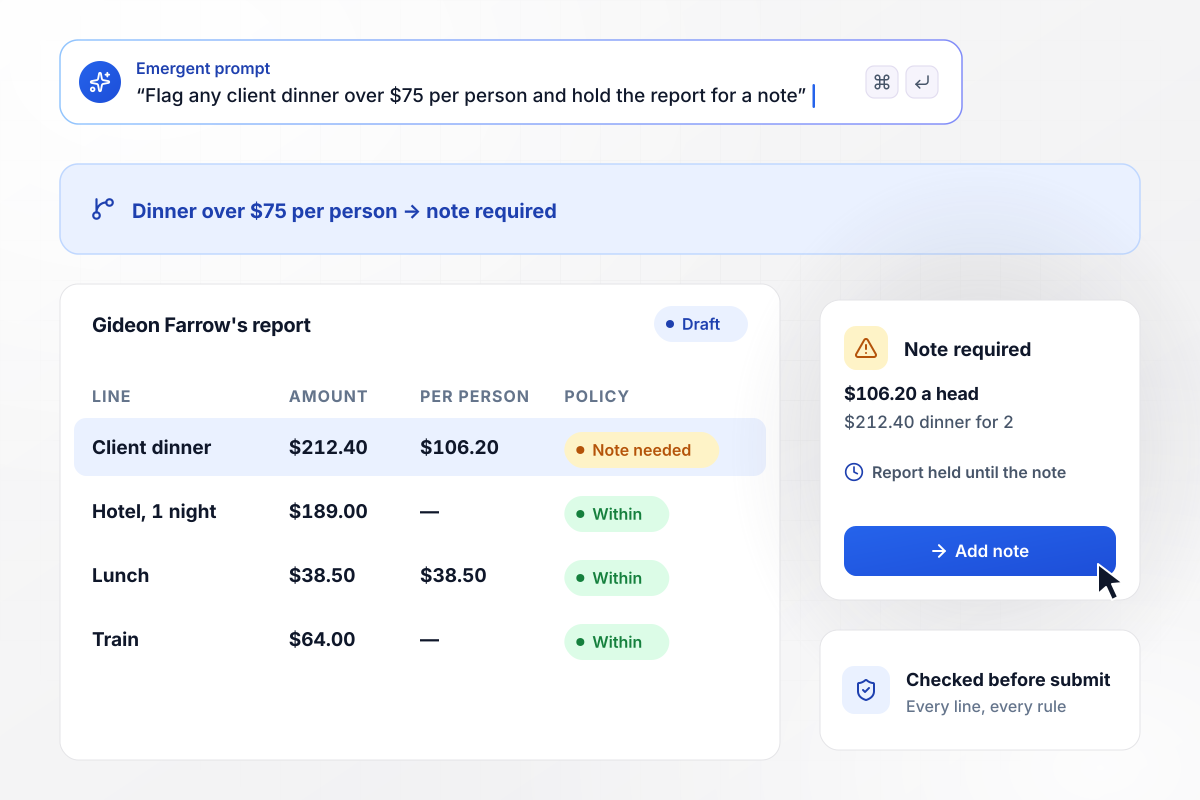
Dinners over $75 a head need a note first
Tallowmere Consulting allows $75 per person for a client dinner. Gideon Farrow adds a $212.40 dinner for 2, which comes to $106.20 a head, so the app flags the line before he submits. His report waits until he writes a note on why the dinner ran over.
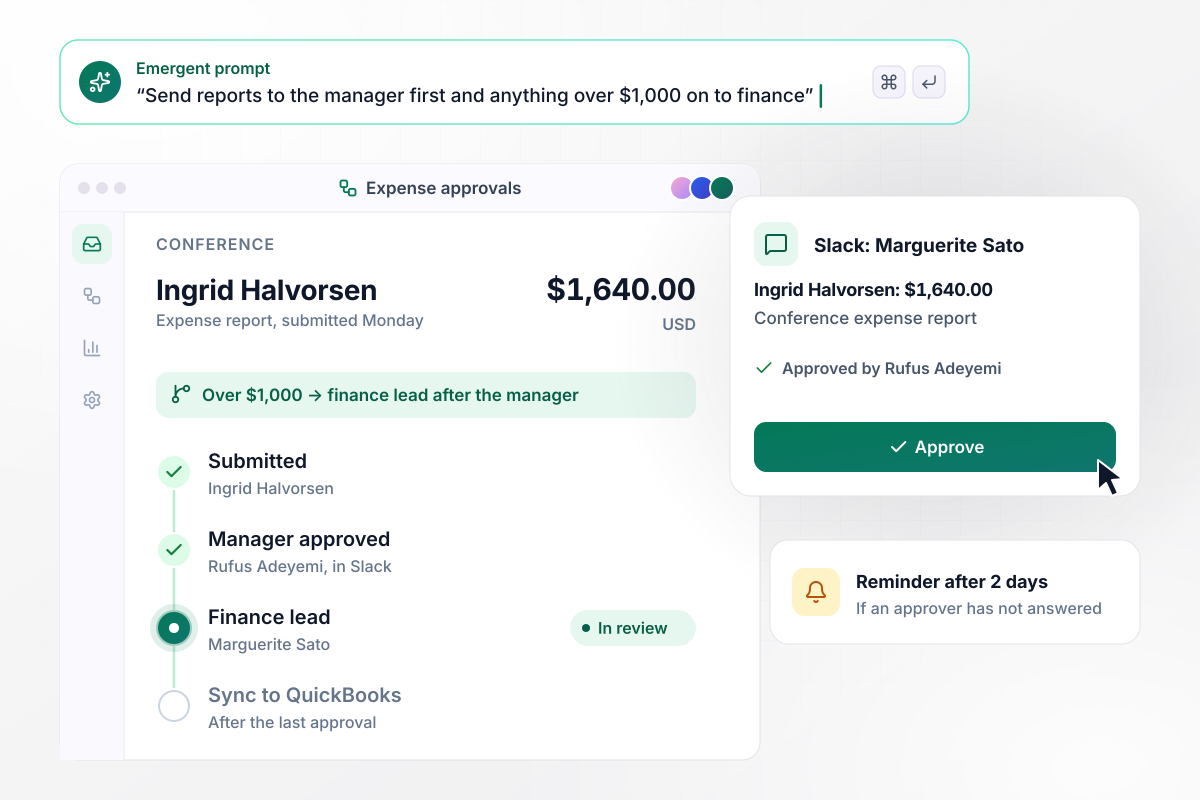
Reports over $1,000 go on to finance
Ingrid Halvorsen submits a $1,640.00 conference report, and her manager, Rufus Adeyemi, approves it from a Slack message. Because the total is over $1,000, the report then goes to finance lead Marguerite Sato in a Slack message of her own. An approver who has not answered in 2 days gets a reminder.
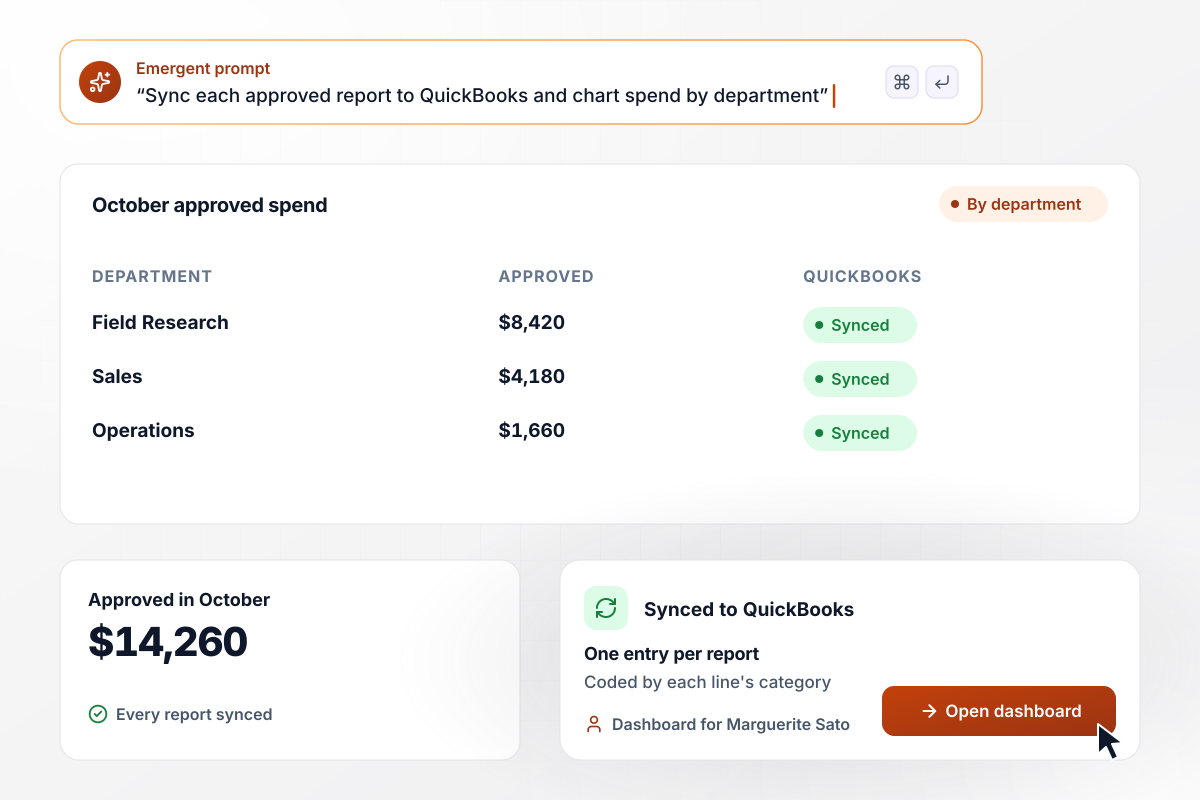
QuickBooks gets each report, finance gets the totals
Every approved report syncs to QuickBooks as one entry, coded by the categories on its lines. Marguerite sees October's $14,260 of approved spend by department on a dashboard: Field Research at $8,420, Sales at $4,180, and Operations at $1,660.






How to Automate Expense Reports
These 7 steps get expense report automation checking each line against your policy and sending each report to its approver.
Write down the policy the way employees already follow it: the meal limit per person, the hotel cap per night, the amount above which a receipt is required, and who approves what. Keep every number exact, because each one becomes a rule.
Tell Emergent in plain English how a report travels: an employee adds receipts, each line is checked, and the report goes to the manager, then to finance above your threshold. Emergent builds the app and its approval screens from that prompt.
Connect the accounting software and the HR system. The app reads your expense categories from the ledger, and it takes each employee's approver from the reporting lines in HR.
Pick Slack, email, or the app's own approval screen for each approver. Set how long a report can wait before a reminder goes out, and name the backup who gets it after that.
Run last month's reports through the app before anyone files a new one. Compare its flags with what finance caught by hand, and adjust a rule wherever the two disagree.
Open the app to the team that travels the most and let them file real trips for a month. If a rule flags nearly every report, it is set too tight: loosen it before the next team joins.
Add the next rule set once the first runs cleanly: mileage, a daily meal allowance, or a separate chain for one department. Each change is a new prompt to Emergent.
Why Automate Expense Reports With Emergent?
Emergent builds the expense app itself, from the report screen to the approval chain, with no task cap and a database you own.

|
Zapier | Make (Integromat) | n8n | |
|---|---|---|---|---|
| How you build | Prompt for the workflow and the app around it | Templates and editor, AI copilot | Visual canvas | Visual canvas, self-hosted or cloud |
| What you get | Workflow + trigger form + database + dashboard, as code you own | Zaps, plus Tables and Interfaces inside Zapier | Scenarios inside Make | Workflows inside n8n |
| Behavior at cap | Keeps running, no task cap | Overage billed at up to 1.25× the base rate | Runs pause | Cloud workflows stop until the reset or an upgrade |
| AI and agent steps | Native, share the same credit pool | Priced by model tier, drawn from the task pool | AI modules cost variable credits | Bring your own model API key, billed by the provider |
| Code ownership | Full code export to GitHub on paid plans | None | None | Yes on Community Edition |

Pick the Pricing Plan That Works for You
Choose the plan that fits your building ambitions. From weekend projects to enterprise applications, we've got you covered.




Find the right workflow automation
for you and your business
Frequently Asked Questions
Your Questions, Answered
Don't change this element unless you know what you are doing
More things you can build
with Emergent









on Emergent today


