

Build Shipping Automation for Labels and Late Packages
Build shipping automation that buys the right label for each order and tells your team when a package stops moving.
Create shipping automation that buys the cheapest on-time label for each order and alerts my team when a package stalls.
Trusted by Builders Worldwide
Active Builders Worldwide
Apps Successfully Created
Countries Globally Reached



What Your Shipping Workflow Runs Each Day
Shipping automation does the label and tracking work on every order. Carrier contracts and packaging stay your call.
Quotes from every carrier you connect
Connects to EasyPost, Shippo, or a carrier's own API. Each paid order gets quotes from your accounts at your negotiated rates, and the rate picked is saved with the reason.
Shipping rules written as plain sentences
Describe a rule the way you would tell a new hire, such as ship anything over 5 lb by ground. Emergent turns it into code you can read, and each new rule is one more prompt.
Shipments and products in your database
Stores every label, tracking event, and HS code in a database you own. Support sees where a parcel is without opening a carrier site, and finance can total label spend by month.
Exceptions go to a named person
Sends a Slack message or an email when an address fails or a parcel stalls. The alert names the order and its last scan, and it escalates to a second person if nobody answers it.
Peak season with no task cap
Runs every order through the same rules in the week before a holiday cutoff. When volume triples, there is no task cap for the extra label runs to hit, and nothing waits for a reset.
Your shipping code in GitHub
Exports the full codebase to your GitHub repository on paid plans. A developer can add a regional carrier or edit a rule in code, and the app runs wherever your stack is hosted.
Four Shipping Jobs Worth Automating First
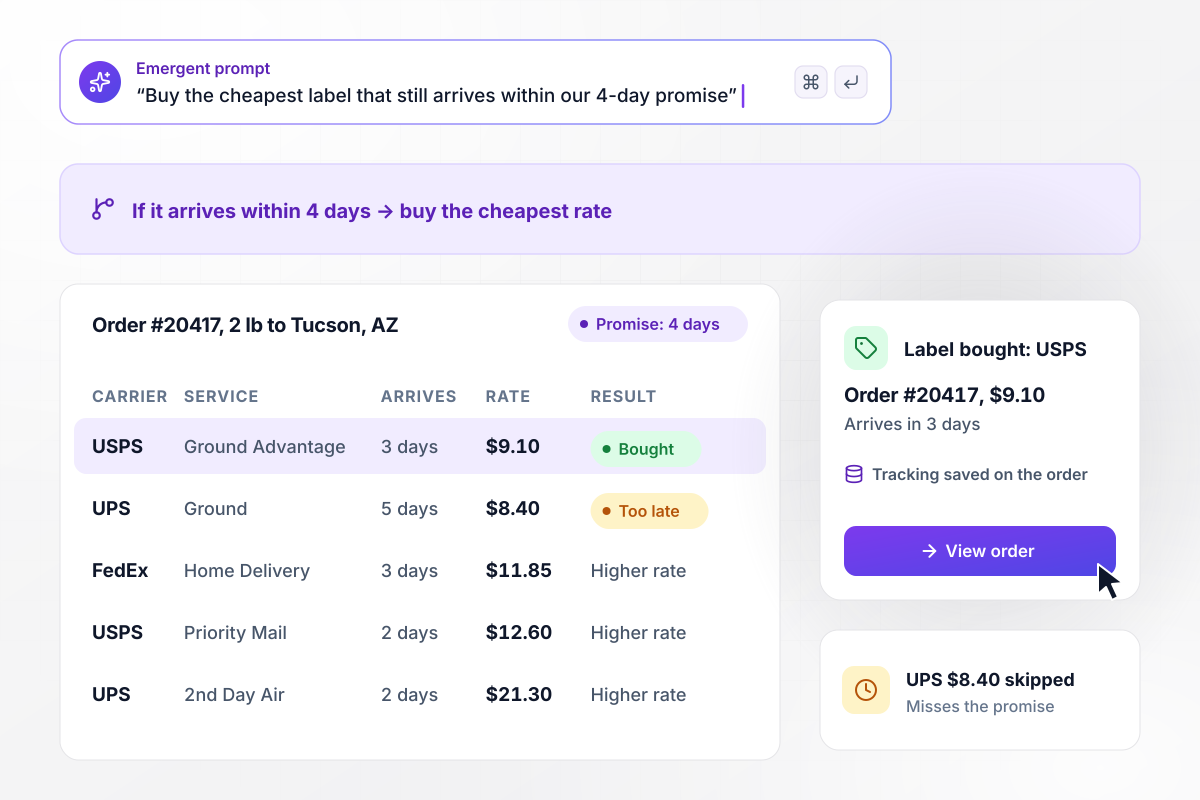
The cheapest label that still keeps the 4-day promise
Hollow Pine Roasters ships coffee from Ohio and promises delivery within 4 business days. When an order is paid, the app pulls quotes from its USPS, UPS, and FedEx accounts. A cheaper rate that would arrive late is skipped. The lowest on-time rate is bought, with the carrier and tracking number saved on the order.
window.awbMockup = { rateShopping: "Build rate shopping for my coffee store. We ship from Ohio and promise delivery within 4 business days. When an order is paid, get quotes from our USPS, UPS, and FedEx accounts through EasyPost, skip any rate that would arrive late, and buy the cheapest one left. Save the carrier and tracking number on the order.", batchLabels: "Build a daily label batch for my store. At 2:00 PM on weekdays, buy labels for every order paid since the last run. Verify each address first; hold any that fail and email that customer to confirm the street and unit. Send the labels with a packing list sorted by bin to Teo Marsh, our warehouse lead.", stalledPackages: "Build stalled package alerts for my store. Save every tracking update from EasyPost against its order. If a package has no new carrier scan for 72 hours, send our support lead Ines Calder a Slack direct message with the order number and last scan location. Email the customer a short delay notice in the same hour.", customsForms: "Build customs declarations for my store's orders to Canada and the UK. Before the label prints, fill a line per item from our product table with the description, HS code, origin, and value in US dollars. If a product has no HS code, hold the order for Teo Marsh, and save the code he adds so later orders reuse it." };
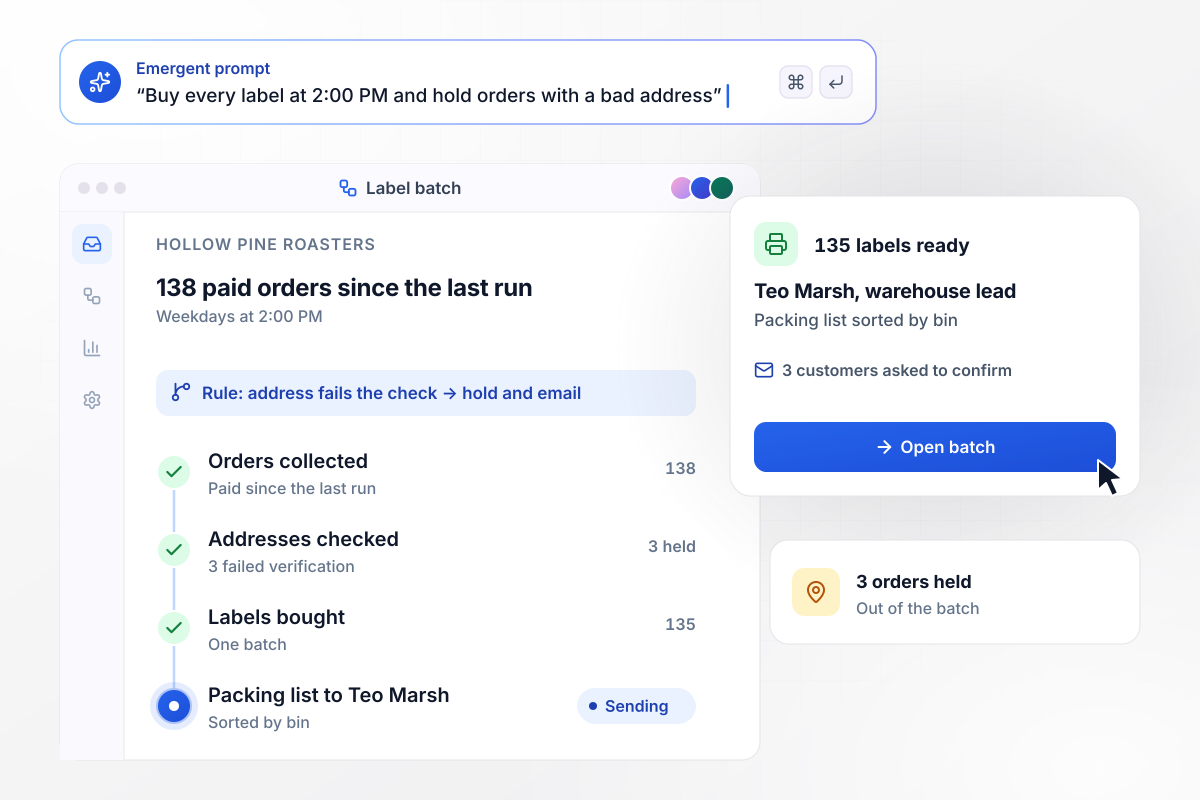
135 labels bought before the afternoon pickup
At 2:00 PM on weekdays, the app buys labels for every order paid since the last run. Today that is 138 orders. Three addresses fail the shipping API's check and stay out of the batch while those customers confirm them by email. Teo Marsh, the warehouse lead, gets 135 labels with a packing list sorted by bin.
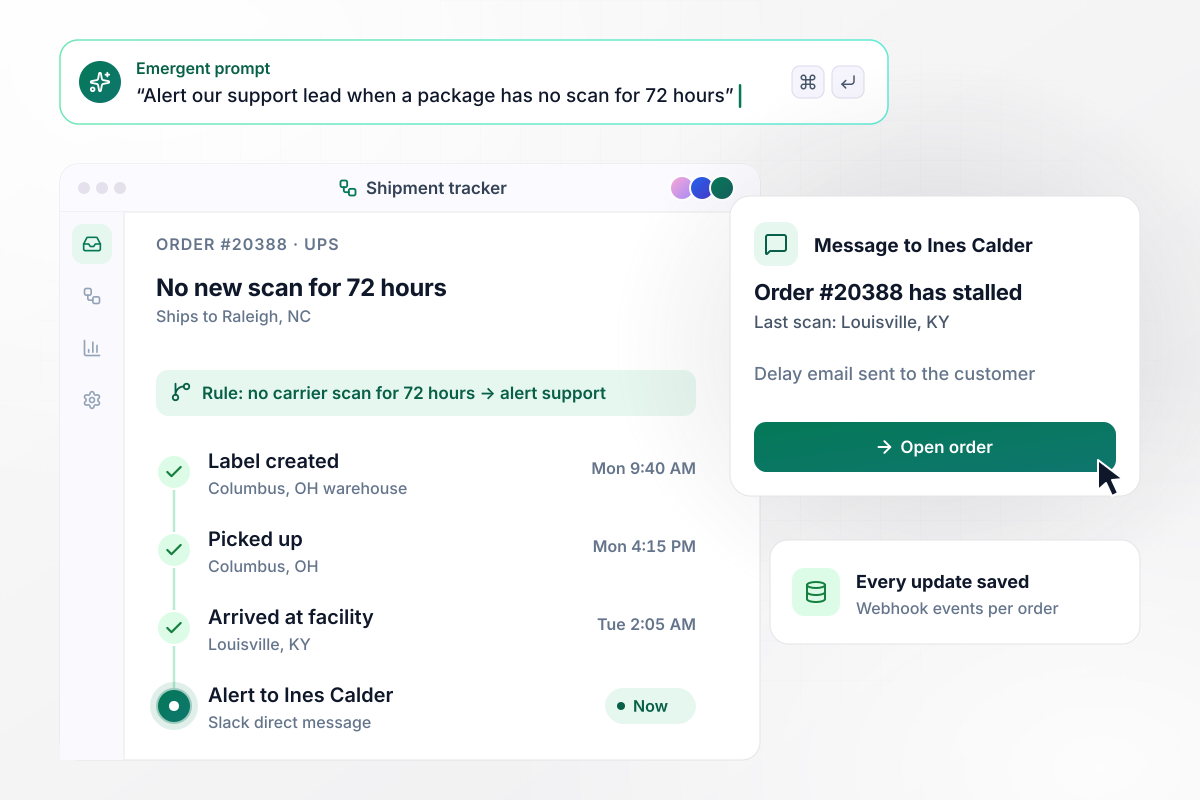
A package stalled for 72 hours goes to one person
Tracking updates arrive by webhook and are saved against each order. If a package shows no new carrier scan for 72 hours, Ines Calder, the support lead, gets a Slack direct message with the order number and last scan location. The customer gets a short delay email in the same hour.
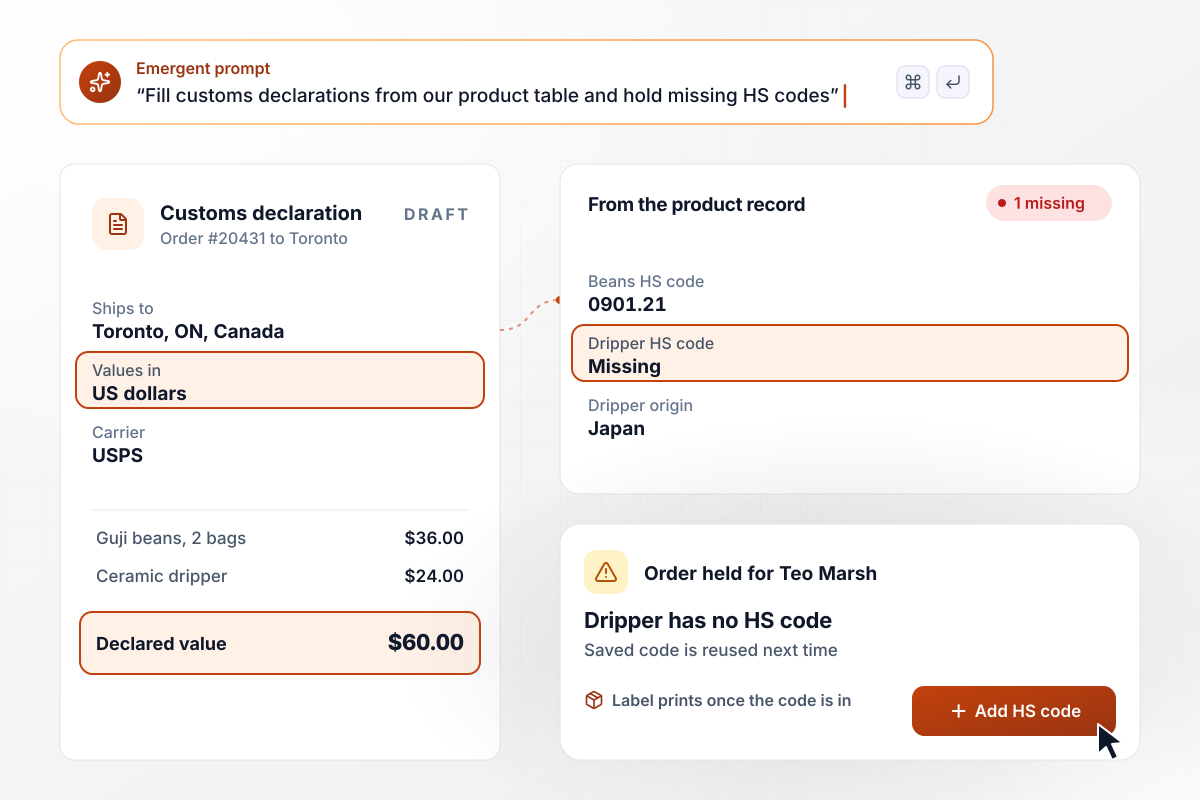
A customs declaration for each order leaving the US
Every order to Canada or the UK gets a customs declaration before the label prints. The app fills each line from the product record: description, HS code, origin, and value in US dollars. An order with a product missing its HS code waits for Teo Marsh, and the code he adds is reused on every later order.






How to Build Shipping Automation
Seven steps to set up shipping automation on your own carrier accounts, tested on past orders before it buys a live label.
Count the minutes your team spends each day comparing carrier quotes, retyping addresses, printing labels, and answering where-is-my-order emails. Write down which carrier accounts you pay for and the delivery promise shown on your checkout page.
Link the carrier accounts you already have through a shipping API such as EasyPost, where adding an account gives access to the rates you negotiated with that carrier. Add the warehouse address and each box size you stock, with its inside dimensions.
Record each product's packed weight and the box it ships in. UPS bills a package at the greater of its actual weight and its dimensional weight, which comes from the box size. A light bag of beans in an oversized box can cost more than it weighs.
Write each rule as you would explain it to a new packer: the delivery promise, the batch time, how long a parcel may sit without a scan, and who hears about it. Emergent builds the workflow, its tables, and a dashboard your team can open.
Run last week's orders through the rules without buying any labels. Compare the carrier and cost the app picks for each order with what your team bought by hand, and adjust any rule that chose differently before it touches a live order.
Switch on domestic orders first and keep international ones manual for a week. Check the afternoon batch against the packing station's count each day, and read every held address to see why it failed the check.
Turn on the stalled-parcel alerts once labels run cleanly, then the customs step for orders leaving the US. Each new rule reads the same order and product tables, and an HS code your team adds once is there for the next order.
Why Build Shipping Workflows With Emergent?
Emergent builds the shipping workflow and the app your team works in, on a database you own, with no task cap on your busiest day.

|
Zapier | Make (Integromat) | n8n | |
|---|---|---|---|---|
| How you build | Prompt for the workflow and the app around it | Templates and editor, AI copilot | Visual canvas | Visual canvas, self-hosted or cloud |
| What you get | Workflow + trigger form + database + dashboard, as code you own | Zaps, plus Tables and Interfaces inside Zapier | Scenarios inside Make | Workflows inside n8n |
| Behavior at cap | Keeps running, no task cap | Overage billed at up to 1.25× the base rate | Runs pause | Cloud workflows stop until the reset or an upgrade |
| AI and agent steps | Native, share the same credit pool | Priced by model tier, drawn from the task pool | AI modules cost variable credits | Bring your own model API key, billed by the provider |
| Code ownership | Full code export to GitHub on paid plans | None | None | Yes on Community Edition |




Pick the Pricing Plan That Works for You
Choose the plan that fits your building ambitions. From weekend projects to enterprise applications, we've got you covered.




Find the right workflow automation
for you and your business
Frequently Asked Questions
Your Questions, Answered
Don't change this element unless you know what you are doing
More things you can build
with Emergent









on Emergent today


