

Build Procurement Automation Around How Your Team Buys
Build procurement automation that routes each purchase request by category and flags spend that skips your contracts.
Build procurement automation for my company's purchase requests, supplier quotes, and catalog orders.
Trusted by Builders Worldwide
Active Builders Worldwide
Apps Successfully Created
Countries Globally Reached



What Procurement Automation Handles
Procurement automation runs each purchase by your written policy, from the first request to the order a vendor fills.
Requests written in plain words
Staff describe what they need in a sentence. The app reads it into a category, an amount, and a cost center, then starts the approval path your policy sets for that category.
Approvers chosen by category and amount
Software goes past IT security and services past legal. Anything above the budget owner's limit adds finance, and a reminder reaches any approver who holds a request for two days.
Supplier quotes collected for larger buys
Above your quote threshold, one scope goes to several suppliers with a deadline. Replies sit side by side on one screen, and the buyer awards the work with every price in view.
A catalog of contracted prices
Items you buy under contract sit in a catalog with the agreed price and pack size. Small orders from that list can go out as a PO at once, while anything off it goes to a buyer.
Card spend checked against contracts
Card and invoice spend is compared weekly with the contracts your team negotiated. A purchase that went elsewhere for an item under contract goes to the owner of that category.
Buying rules you can export as code
Your thresholds and approval paths export as readable code to your GitHub repository on paid plans. Every request and every order is a row in a database your team owns.
Procurement Processes to Automate First
Every software request gets an IT check first
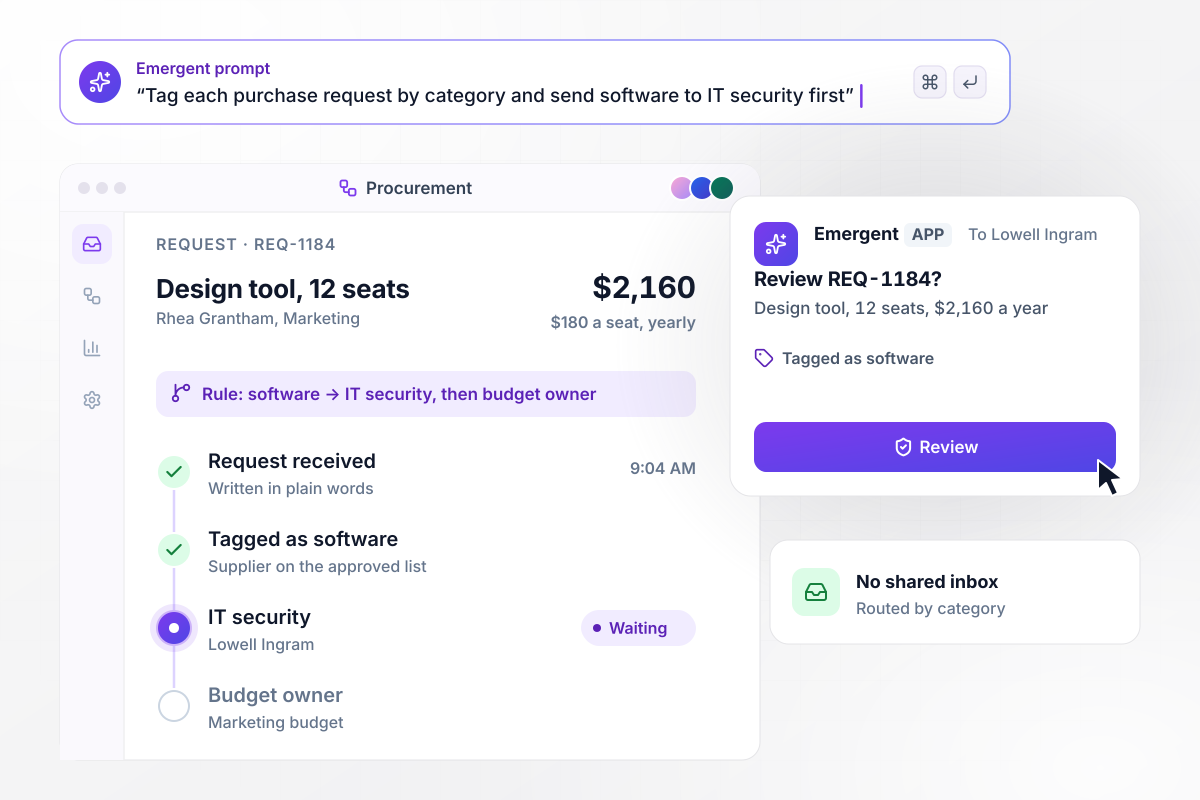
Rhea Grantham in marketing writes that her team needs 12 more seats on its design tool, about $2,160 a year. The app tags the request as software, finds the supplier on the approved list, and sends it to Lowell Ingram in IT security before the budget owner sees it. Nothing sits in a shared procurement inbox.
window.awbMockup = { requestIntake: "Build a purchase request app for my company. Staff describe what they need in a sentence, and the app fills in the category, supplier, amount, and cost center. Software requests need IT security sign-off before the budget owner sees them, and every vendor is checked against our approved list. Show each open request and who it is waiting on.", competitiveQuotes: "Build quote collection for my facilities team. Any purchase over $10,000 needs three quotes. Send one scope to three suppliers with a reply deadline, collect each price in one table, and let our buyer award the contract with a note on why. Save every quote and the award decision with the original request.", catalogBuying: "Build a catalog for my lab staff with our contracted items, prices, and suppliers. Orders under $500 from the catalog need no approval and go to the supplier as a numbered PO when submitted. Anything not in the catalog goes to our buyer instead. Track spend by lab each month.", offContractSpend: "Every Monday, pull last week's company card transactions and compare each one with our contracted supplier list. When someone buys a contracted item from another supplier, send the category owner a direct message with both prices and the gap. Keep a weekly list of every off-contract purchase." };
Three supplier quotes land in one table
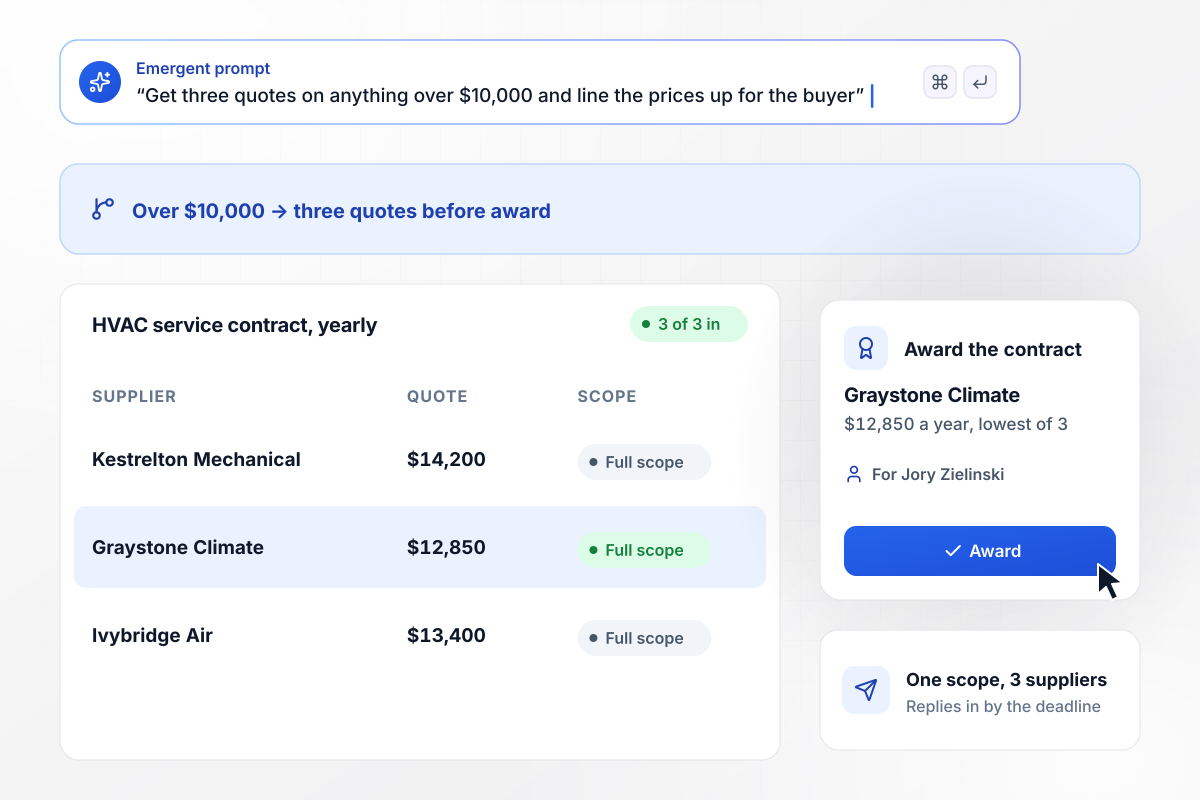
Facilities requires three quotes on anything over $10,000. For a yearly HVAC service contract, one scope goes to Kestrelton Mechanical, Graystone Climate, and Ivybridge Air. The replies come back at $14,200, $12,850, and $13,400, and Jory Zielinski awards the work to Graystone Climate.
Under $500 from the catalog, the PO goes straight out
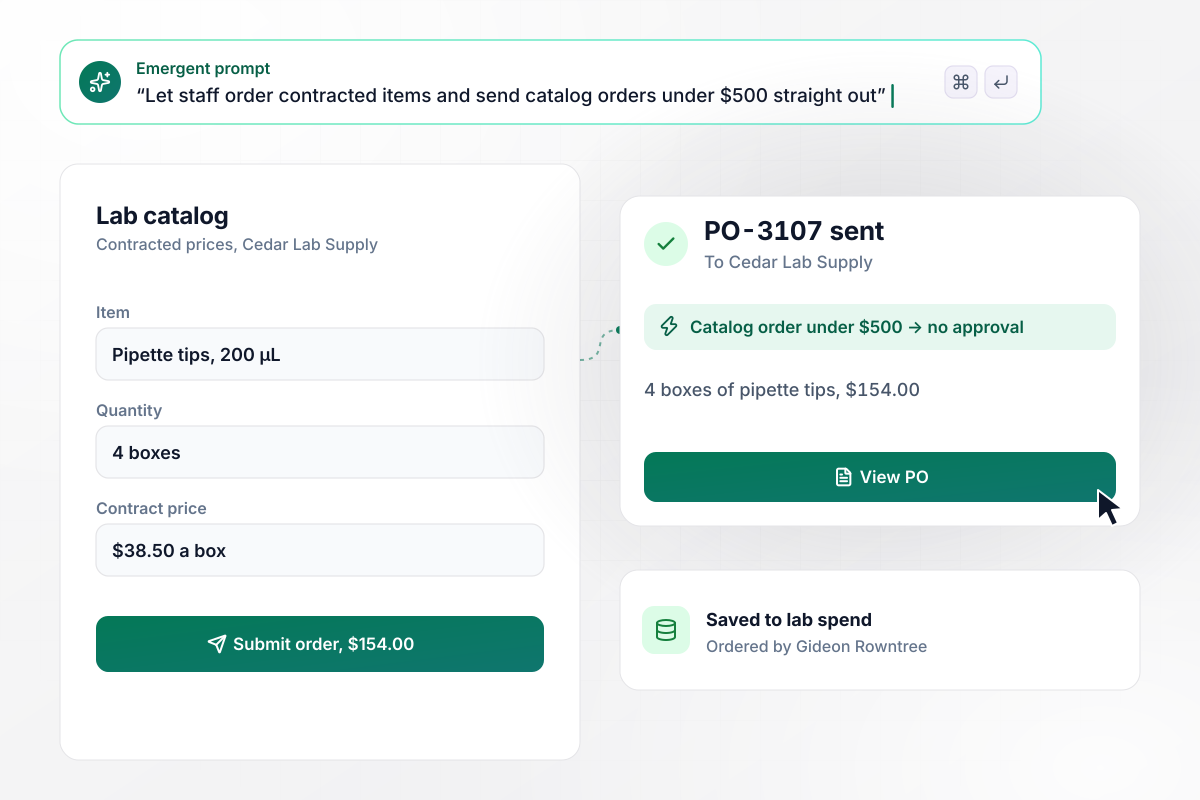
Lab staff order from a catalog of contracted items at the prices Cedar Lab Supply agreed to. Gideon Rowntree picks four boxes of pipette tips at $38.50 a box, $154 in all. Catalog orders under $500 need no approval, and PO-3107 goes to Cedar Lab Supply as soon as he submits.
A card purchase off contract reaches the category owner
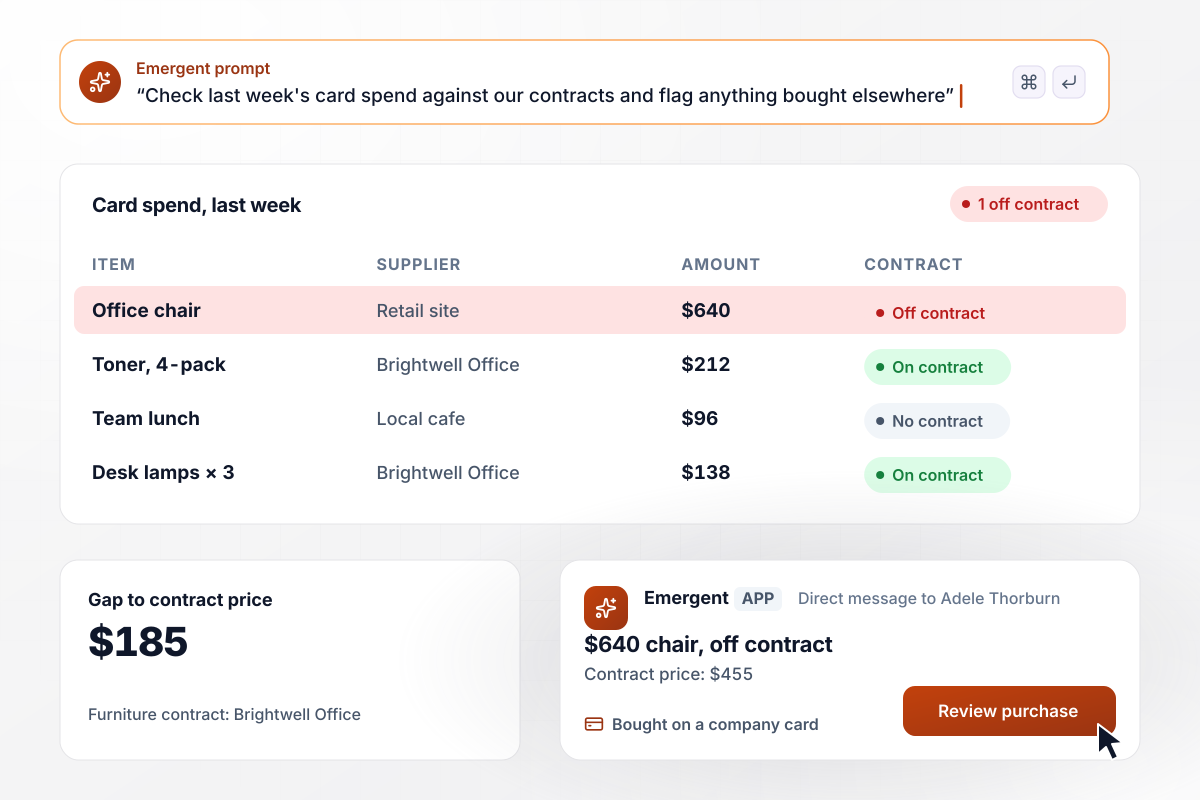
Each Monday the app checks last week's company card spend against the contracted vendor list. A $640 office chair from a retail site is flagged, since Brightwell Office holds the furniture contract at $455 for the same model. Adele Thorburn, who owns furniture, gets a direct message with the $185 gap.






How to Automate Procurement
Seven steps to set up procurement automation that follows your buying policy, tested on last quarter's requests first.
List every route money takes out of the company today: purchase requests, card buys, invoices with no PO behind them, and renewals nobody tracks. Start with the route that carries the most spend and has the fewest checks on it.
Give each rule a dollar figure and an owner. Three quotes above $10,000, finance above $25,000, and legal on any contract that renews itself. Plain sentences are enough for Emergent to build the routing from.
Export the items your contracts cover, each with its unit price and supplier, from the contracts themselves or last year's orders. That list becomes the catalog staff order from and the reference the weekly spend check reads.
Connect the accounting system your team closes in, such as QuickBooks or NetSuite, and the company card feed. Suppliers and cost centers sync in first, and approved orders sync back with their cost center attached.
Have each decision arrive where the approver already works, in team chat or email, with the request and the budget left on that cost center. Name a backup for every approver to cover leave and holidays.
Pull 50 requests from last quarter, including the vague ones written in a hurry. Check the category each one was given and the approvers it reached. Correct any miss by prompting, then run the whole set again.
Launch with one area of buying, such as software, where purchases are frequent and the owners are clear. After a month, read how long each request waited at every step, then bring the next area on.
Why Automate Procurement With Emergent?
Emergent turns your buying policy into a working app, with code you can export and keep changing by prompting.

|
Ivalua | Precoro | Procurify | |
|---|---|---|---|---|
| How you set it up | Prompt for your buying policy and the app around it | Sales-led, implemented by Ivalua or partners | Demo first, then CSM-guided setup | Sales-led, with dedicated onboarding specialists |
| What you get | Request intake, quote comparison, POs, and spend checks, as code you own | Source-to-pay suite with the IVA AI agent | Procurement and AP platform, intake to invoice | Procurement from request to AP and spend cards |
| Behavior at cap | Keeps running, no task cap | Quote-based; no plan limits published | Users capped by plan; unlimited on Enterprise | Unlimited basic users; priced by Pro users |
| AI and agent steps | Native, share the same credit pool | IVA agent built in; more AI among add-ons | AI assistant and agents on upper plans | AI spend assistant included on every plan |
| Code ownership | Full code export to GitHub on paid plans | None | None | None |




Pick the Pricing Plan That Works for You
Choose the plan that fits your building ambitions. From weekend projects to enterprise applications, we've got you covered.




Find the right workflow automation
for you and your business
Frequently Asked Questions
Your Questions, Answered
Don't change this element unless you know what you are doing
More things you can build
with Emergent









on Emergent today


