

Build a Time Sheet Form That Does the Math
Build a time sheet form that turns clock times into weekly hours, with lunch breaks taken out and overtime split for approval.
Build a weekly time sheet form that deducts unpaid lunches, flags hours past 40 and sends each sheet to a supervisor.
Trusted by Builders Worldwide
Active Builders Worldwide
Apps Successfully Created
Countries Globally Reached



Hours Counted the Way Payroll Reads Them
A printable sheet leaves the adding to whoever checks it on Friday. Emergent's version does the math as each day goes in.
Daily totals from punch times
Turns each day's punch-in and punch-out times into hours, minus breaks, then adds the days into a week. Nobody types a total, and no supervisor re-adds a column to check it.
Unpaid meal breaks deducted
Subtracts meal breaks of 30 minutes or more and keeps short rest breaks in the day's hours. The Department of Labor treats short breaks as paid time and meal periods as unpaid.
Overtime kept in its own column
Moves any time beyond 40 hours in the workweek into a separate overtime column. The supervisor approves both figures together, and your payroll provider applies the rate.
A job or client code on each entry
Asks for a job number or client code on every line and returns any entry left blank. Hours then roll up per code, ready for a job costing report or the next client invoice.
Approval that locks the sheet
Sends each submitted sheet to the employee's supervisor in Slack or email. Approved entries lock, and any later edit needs a reason and records who changed it and when.
Code you can take anywhere
Exports the full codebase to your GitHub repo on paid plans. Extend it later with a payroll API sync or a kiosk clock-in screen, or ask Emergent for either one in a new prompt.
Time Sheet Forms by Type of Work
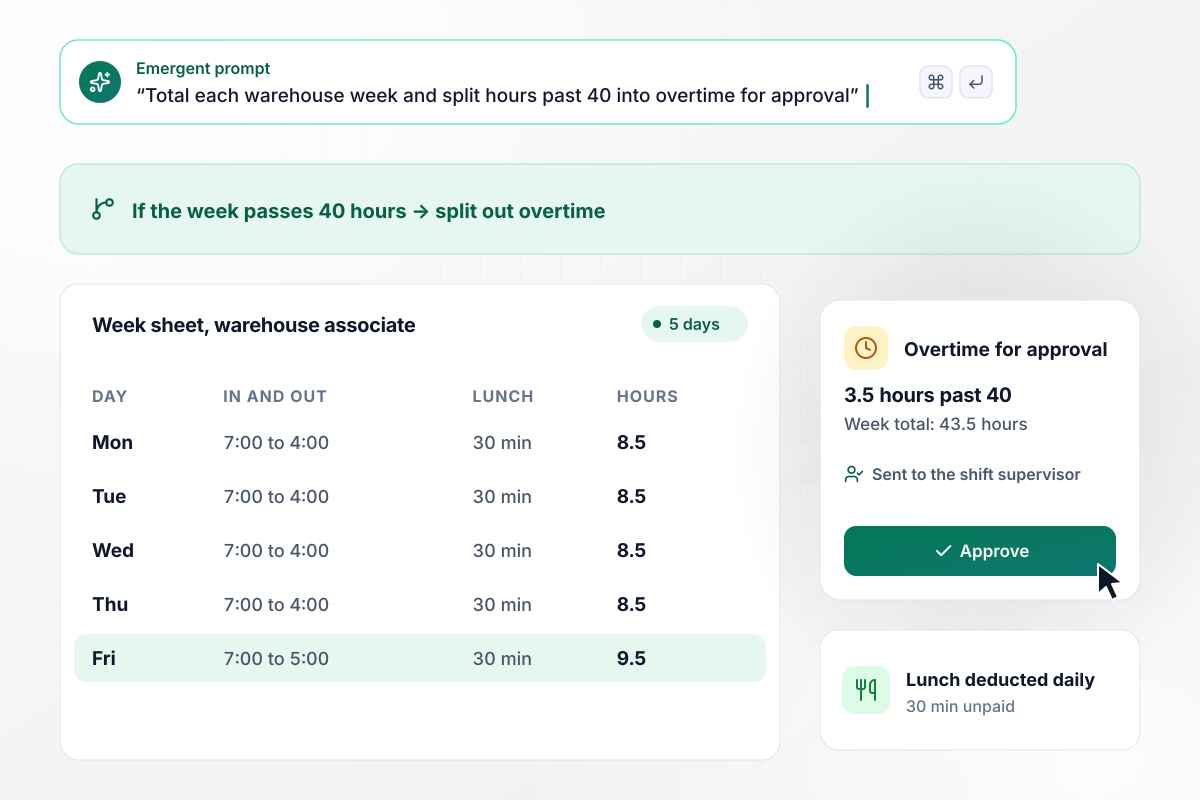
Which of the 43.5 hours count as overtime
Overtime starts after hour 40. A warehouse associate works five days with a 30-minute unpaid lunch each day. The form deducts every lunch, totals the week at 43.5 hours and separates the 3.5 past 40. Federal law requires overtime pay for those unless she is exempt, and her supervisor approves them first.
window.awbMockup = { hourlyOvertime: "Build a weekly time sheet for my warehouse staff. Each day they enter a clock-in time, a clock-out time, and their lunch length. Subtract lunches of 30 minutes or more, total the week and move anything past 40 hours into an overtime column. Send the sheet to the shift supervisor to approve, with regular and overtime hours shown separately.", constructionCrews: "Make a crew time sheet for my site foremen. The foreman enters hours for each worker against an open job number picked from a dropdown. Show the running total for each job as entries come in. If an entry has no job code, send it back to that worker to fix before the week closes and leave it out of the job totals.", homeCareVisits: "Build a visit log for my home care aides. On their phone, the aide taps start on arrival and finish on leaving, and the app records the visit length. The client signs on the screen before the aide leaves. Send each signed visit to our scheduler and add its hours to the aide's time sheet for the pay period.", payPeriodClose: "When our pay period closes on Sunday night, check who has submitted a time sheet. On Monday morning, send me a Slack message with how many sheets are approved and who is missing, plus a button that reminds the missing people. Route each late sheet to the right supervisor as soon as it is submitted." };
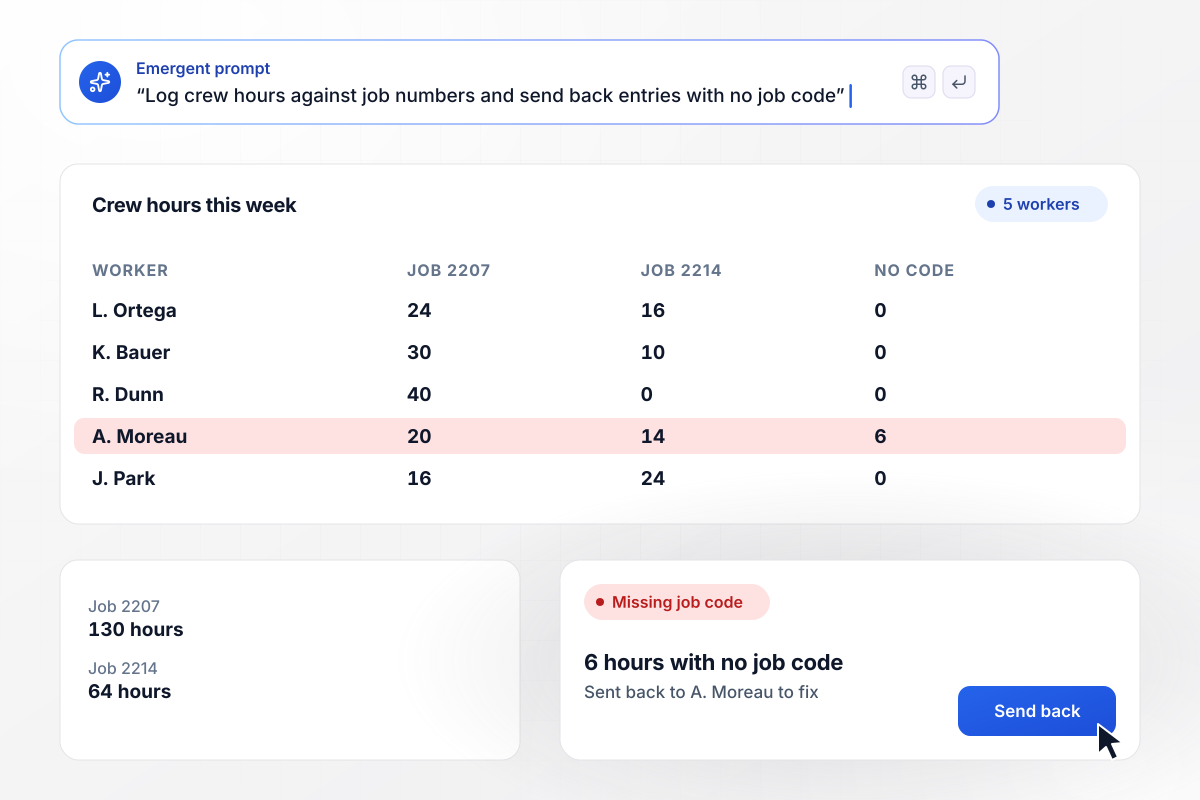
Every hour lands on a job number
Construction payroll and job costing read the same sheet. A site foreman logs a crew of five against Job 2207 and Job 2214, and the form totals each job as entries arrive. One six-hour entry came in with no job code. It goes back to the worker to fix and stays out of both totals until then.
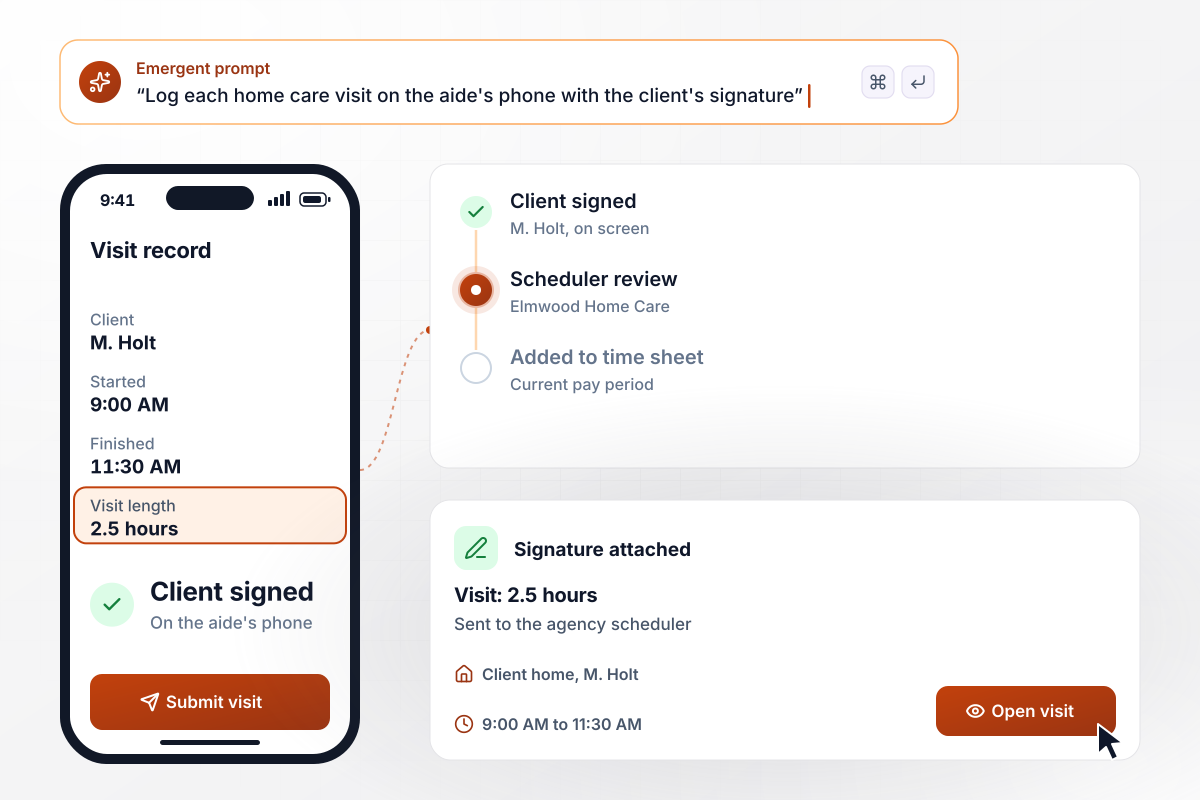
Proof of each visit, signed by the client
Home care runs on visits, not shifts. An aide taps start when she arrives at a client's home and finish when she leaves. Before she goes, the client signs on her phone screen. The visit reaches the agency's scheduler with the signature attached, and its 2.5 hours land on the aide's time sheet.
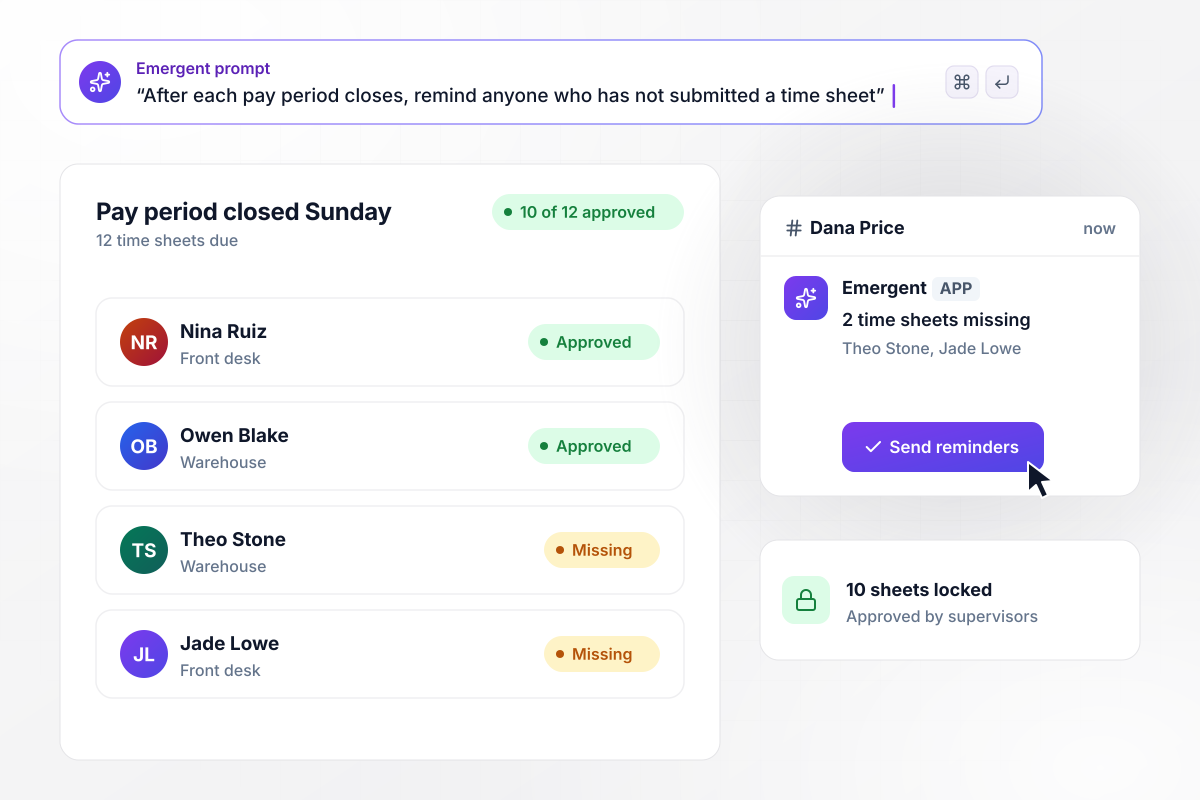
Who still owes a sheet by Monday
Payroll can only run on sheets that exist. The pay period closes Sunday night. On Monday morning a Slack message tells the office manager that 10 of 12 sheets are approved and two never came in. One click sends both people a reminder, and each late sheet goes to its supervisor once it is submitted.






How to Create a Time Sheet Form
Seven steps to a time sheet form that settles break and overtime rules up front and leaves the arithmetic to the form.
Choose the period payroll already runs on, weekly or biweekly. It sets how many rows the sheet needs and when it closes. Overtime is counted per workweek, and a biweekly sheet needs a subtotal for each of its two weeks.
Have people enter when they started and finished each day, plus the length of any break, instead of a typed total. Totals entered by hand drift by quarter hours. Times let the form do the math and show when each shift happened.
Federal rules count short rest breaks as hours worked and treat a real meal period as unpaid. Give each its own field, start the deduction at 30 minutes, and show it on the sheet so the employee can check the math.
Keep regular hours and anything over 40 in a workweek in separate columns. Nonexempt employees earn at least time and a half for those extra hours under federal law. Check your state's rules too, then show both totals to the approver.
When hours feed job costing or a client invoice, add a job or client code to each entry. Make it a dropdown of open jobs instead of free text. Entries with a blank code go back before the week closes.
Send each sheet to the employee's direct supervisor when the period ends, with a reminder for anyone who has not submitted by the next morning. Lock approved sheets so later edits need a reason and leave a trail.
Keep every approved sheet and every edit in one place for at least two years, the period the Department of Labor gives for time cards. At each close, export approved hours to payroll split into regular and overtime.
Why Build Time Sheets With Emergent?
Each entry and every later edit is stored in a database you own, ready for the payroll export.

|
Jotform | Google Forms | Typeform | |
|---|---|---|---|---|
| How you build | Describe it in plain English | Templates, editor, AI generator | Editor, with Gemini drafting on some Workspace plans | Templates, editor, AI assist |
| Where responses live | A database table you own, plus any integration | Jotform account | Google Sheets | Typeform account |
| Response limits | No response caps | Monthly submission caps by plan; the form stops at the cap | No limit | Monthly response caps by plan; the form closes at the cap |
| Code ownership | Full code export to GitHub on paid plans | None | None | None |



Pick the Pricing Plan That Works for You
Choose the plan that fits your building ambitions. From weekend projects to enterprise applications, we've got you covered.




Find the right form
for whatever you're collecting














Frequently Asked Questions
Your Questions, Answered
Don't change this element unless you know what you are doing
More things you can build
with Emergent









on Emergent today


