

Build a Book Landing Page With a Buy Link for Every Format
Build a book landing page with a buy link for each format, a free chapter for signups, and a reader list you own.
Build a book landing page that saves every signup to a database I own.
Trusted by Builders Worldwide
Active Builders Worldwide
Apps Successfully Created
Countries Globally Reached



Everything Between the Cover and the Checkout
The retailer takes the payment. Everything a reader sees before the buy button is the page's job.
One buy link per format
List every format once, with hardcover, paperback, ebook, and audiobook each pointing to its retailers. Emergent builds the buttons, and the page counts the clicks on each one.
Pre-order receipts read into fields
Readers who pre-order upload a receipt to claim the bonus. The app reads the format and order date into fields, and any receipt it cannot read clearly goes to you to check.
A sample chapter for an email
Offer the first chapter in exchange for an email address. Every signup is saved as a row in a database you own, stamped with the date and the name of the reader who asked for it.
Signups copied to your newsletter
Connect the email service you already use through its API, and each new reader joins your list as well as your table. Slack and HubSpot connect the same way, for alerts or a CRM.
Release date changed in one message
Tell Emergent the new date, such as "Release moves to April 7," and it updates the pre-order banner and the countdown clock together. New review quotes go in the same way.
The page as code in your repository
Export the finished page to your GitHub repository on paid plans, or keep it hosted on Emergent under your own domain, which uses credits. Either way, you edit it by prompt.
Book Landing Page Examples by Goal
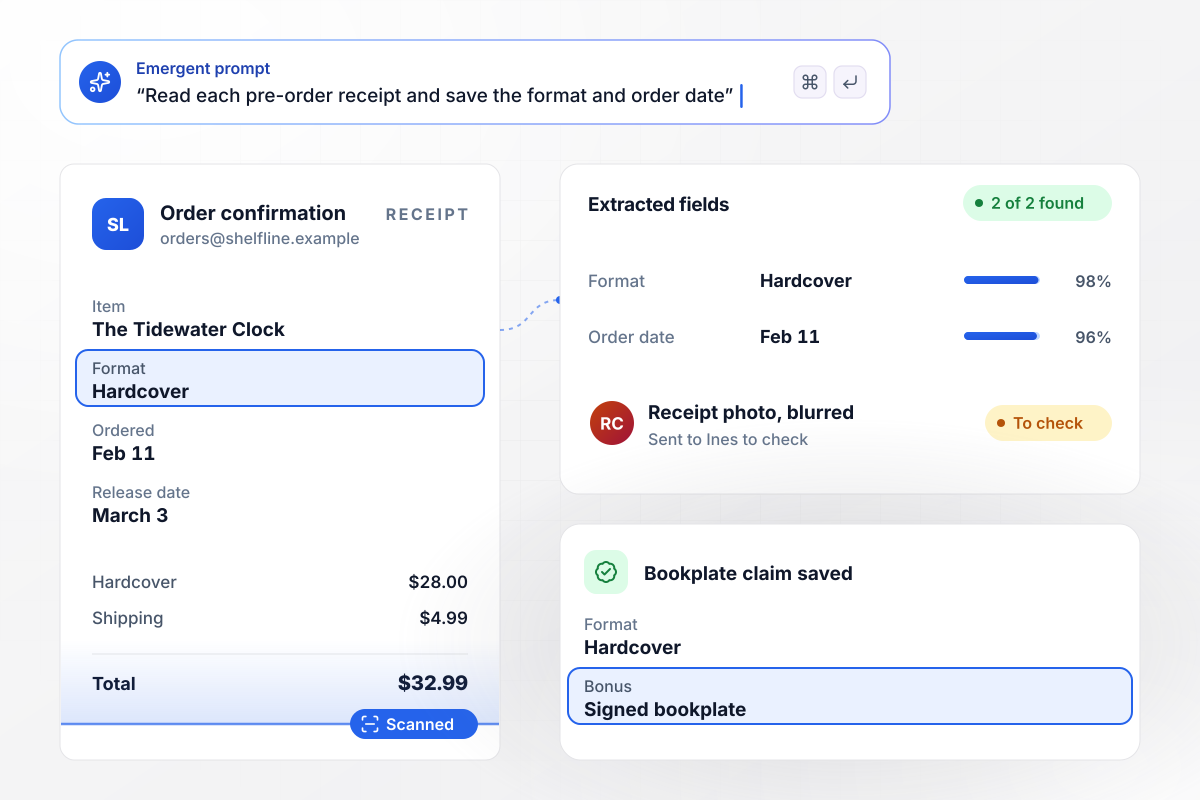
Signed bookplates for readers who pre-order
Ines Calloway's debut novel, The Tidewater Clock, comes out March 3. Until then, her page offers a signed bookplate to anyone who uploads a pre-order receipt. Each receipt's format and order date land in the claims table, next to the reader's name. Receipts it cannot read clearly go to Ines to check.
window.awbMockup = { preOrderPage: "My debut novel comes out March 3. Build a pre-order page that offers a signed bookplate to readers who upload their pre-order receipt. Read the format and order date from each receipt, save both to a claims table, and send me any receipt you cannot read clearly so I can check it.", freeChapter: "I wrote a business book on pricing advisory work. Build a page that gives away the first chapter for an email address, saves every signup to a table, and copies each new reader to my newsletter list through its API so my welcome email goes out. Show me the signup count for the last 4 weeks.", launchWeek: "My cookbook launches next week. Build a book page with separate buy buttons for hardcover, ebook, and audiobook, each linking to its retailers. Count the clicks on every button and give me a launch-week dashboard with the clicks per format and the total.", authorPage: "I write a fantasy trilogy. Build an author page that lists all three books in reading order with a buy link under each one. Add a form where book clubs ask for a video visit. Send clubs of 10 or more readers to me to schedule, and email the discussion guide to smaller clubs." };
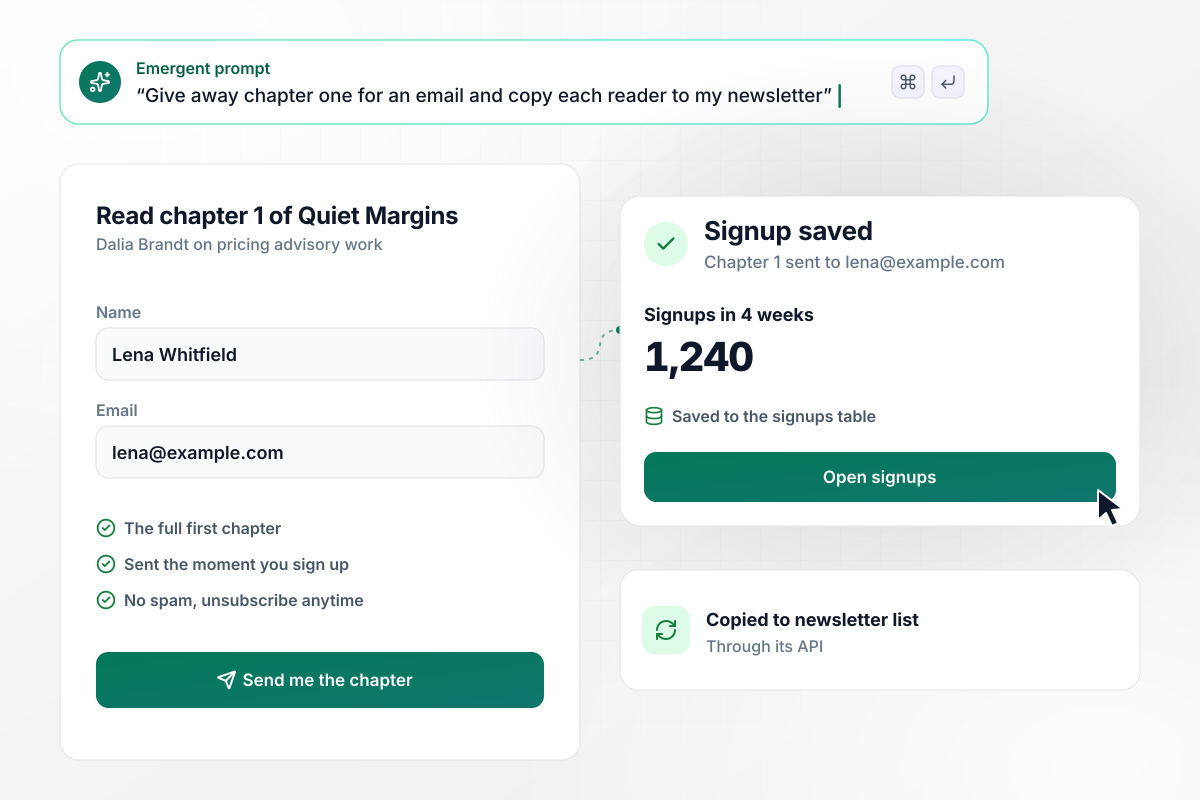
A free chapter drew 1,240 signups
Quiet Margins opens with a chapter on pricing advisory work, and Dalia Brandt gives it away for an email address. In 4 weeks the page collected 1,240 signups. Each new reader is copied to her newsletter list through its API, and her welcome email goes out from the tool she already uses.
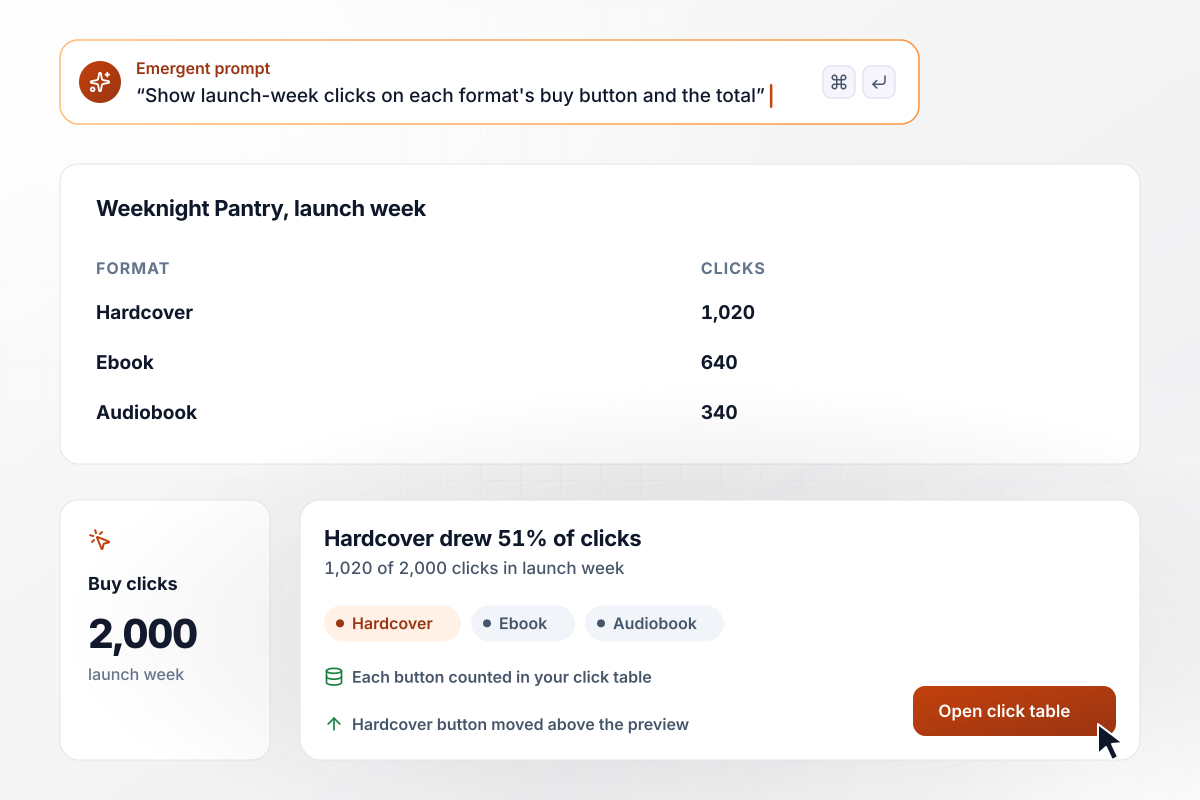
Hardcover beat ebook and audiobook in launch week
In launch week, Theo Marchetti's page for the Weeknight Pantry cookbook sent 2,000 readers to retailers. Hardcover drew 1,020 clicks, ebook 640, and audiobook 340, each counted by its own button. Theo then moved the hardcover button above the recipe preview.
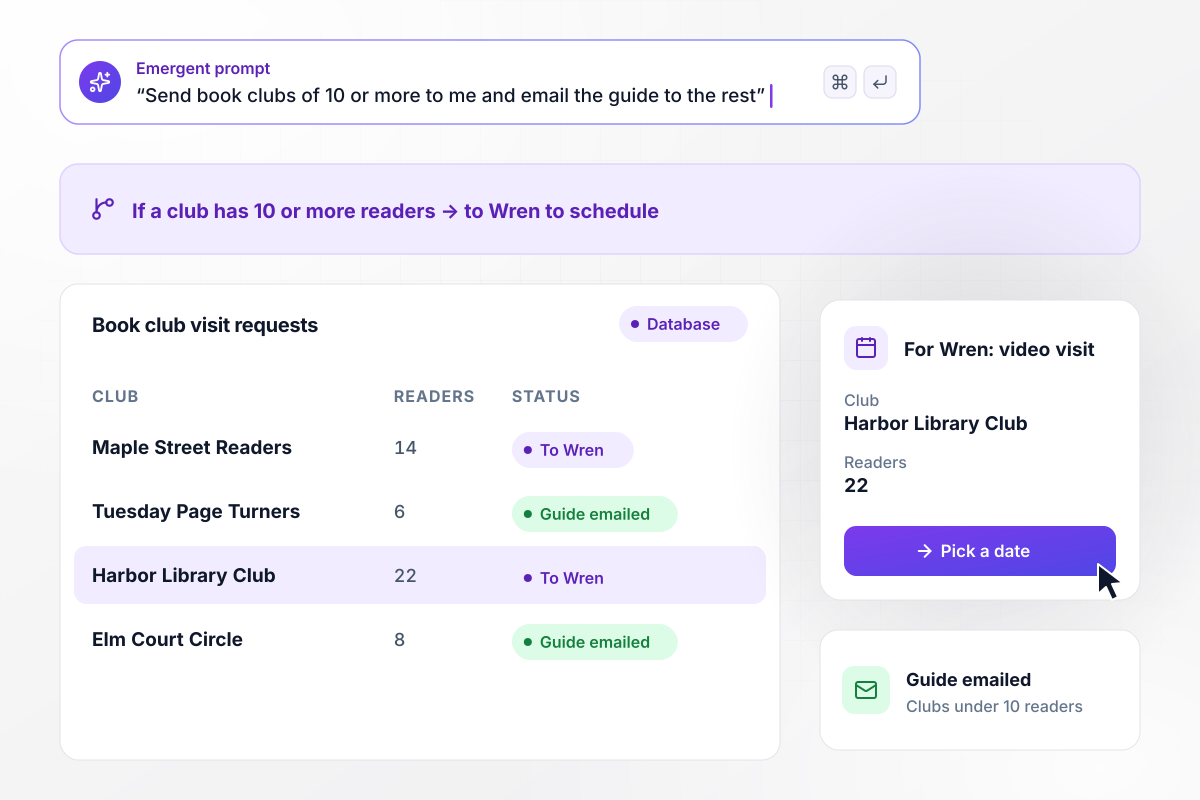
Visit requests from clubs of 10 or more go to Wren
Wren Halvorsen's trilogy, The Lantern Coast, sits on her author page in reading order, with a buy link under each book. Book clubs can ask for a video visit. A club of 10 or more readers goes to Wren to schedule. Smaller clubs get the discussion guide by email.






How to Create a Book Landing Page
Seven steps to a book landing page that turns a visit into a sale or a signup, then build it with Emergent.
Decide what a visitor should do first: buy the book or join your list for a sample chapter. One main action keeps the page short and the results easy to read. Put smaller asks, such as following you on social media, near the bottom.
Place the cover beside a single sentence that says what the book is and who will love it. Add the release date if the book is not out yet. On a phone, a reader should see the cover and the hook without scrolling.
List hardcover, paperback, ebook, and audiobook separately, each with links to the stores that carry it. Label each button with the format, not only the store name. A reader who listens on the commute should reach the audiobook in one tap.
Put the first chapter, or a short story set in the same world, behind an email field. Ask for a name and an email address and nothing more. Send the chapter right away, so the first email a reader gets from you is the one they asked for.
Quote two short blurbs from early reviews, each with the reviewer's name and where the review ran. Print only quotes you have permission to use. Below them, add a short author bio with a photo and a link to your other books.
Open the page on a phone before you share the link. Tap every buy button and confirm it opens the right format at the right store. Then sign up for the sample yourself to check that the email arrives and its link opens the chapter.
After launch, set each format's clicks against the week before. If one format draws fewer clicks than you expected, move its button higher or check its price at each store. Change one thing at a time, then compare again the next week.
Why Build Book Landing Pages With Emergent?
Galleries stop at the cover. Emergent builds the page from a prompt, with buy links and a reader table you own.

|
Unbounce | AI site builders (Wix, Framer) | ConvertFlow | |
|---|---|---|---|---|
| How you build | Prompt for a campaign page | Templates and drag-and-drop, AI copy assist | Prompt for a full site | Templates and drag-and-drop, AI remix |
| Where submissions go | A database table you own, plus integrations | Unbounce lead storage and integrations | Basic contact form to email | ConvertFlow contact profiles, synced to your CRM |
| Visitor limits | No per-visitor pricing | Monthly visitor caps by plan | Site plan bandwidth | Monthly view caps by plan |
| A/B testing | Generate variants by prompt | A/B testing on higher-tier plans only | Limited or add-on | A/B testing on paid plans only |
| Code ownership | Full code export to GitHub on paid plans | Hosted only | Hosted only | Hosted by ConvertFlow or embedded on your site |


Pick the Pricing Plan That Works for You
Choose the plan that fits your building ambitions. From weekend projects to enterprise applications, we've got you covered.




Find the right landing page for you
Frequently Asked Questions
Your Questions, Answered
Don't change this element unless you know what you are doing
More things you can build
with Emergent









on Emergent today




