

Build Accounts Receivable Automation for Every Open Invoice
Build accounts receivable automation that chases overdue invoices, matches payments, and holds orders from late accounts.
Build accounts receivable automation for my coffee roastery that emails each customer 3 days before an invoice is due and again at 7 days past due.
Trusted by Builders Worldwide
Active Builders Worldwide
Apps Successfully Created
Countries Globally Reached



The Follow-Up Work Behind Every Invoice
An invoice is half the job until the cash arrives. Emergent builds the app that chases and matches, and your team makes the calls.
Reminders timed to the due date
You set when each email goes out, before and after the due date, and who receives it. A tighter schedule for one large customer takes a single sentence in a new prompt.
Remittances read into matches
The app reads the remittance attached to a payment and lines up each invoice number with an open invoice. A line it cannot read clearly waits for a person to confirm it.
Every exception has a named owner
Short payments and unmatched deposits go to the person you name for each, never a shared inbox. That person gets a Slack message or an email, and a reminder if it sits untouched.
Late accounts held at the order
Before a new order ships, the app checks the age of the customer's oldest open invoice. An order that breaks your rule waits for an approver, who releases it or keeps the hold.
Aging and DSO on one dashboard
Open balances update by customer and age bucket as payments post. Days sales outstanding sits beside them, and the effect of each new rule shows up in the number you report.
Synced with your accounting system
Invoices and payment records sync with QuickBooks, Xero, or NetSuite through their APIs. Your ledger stays the record, and each payment the app applies is written back.
Four AR Jobs a Finance Team Hands Off First
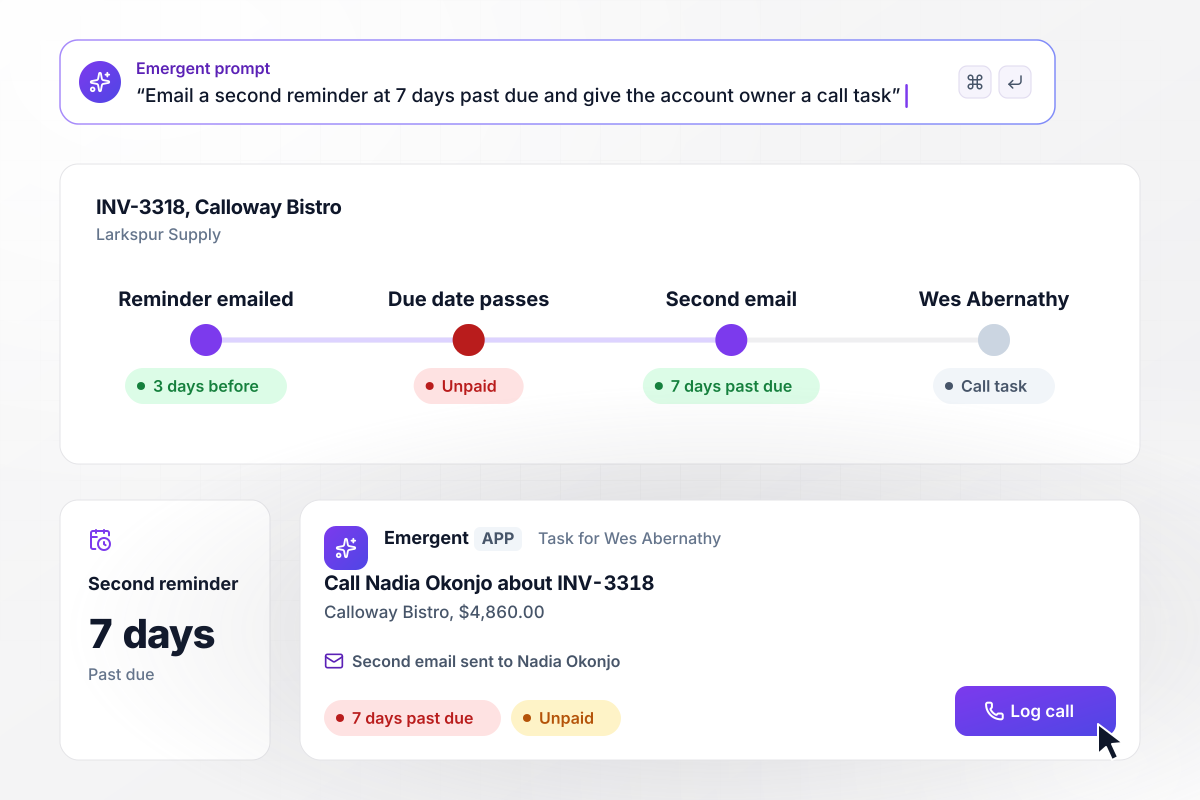
Seven days late, the second email and a call task
Larkspur Supply bills Calloway Bistro $4,860.00 on invoice INV-3318. Three days before the due date, the app emails the invoice to Nadia Okonjo in Calloway's AP team. The due date passes unpaid. At 7 days past due, a second email goes to Nadia, and account owner Wes Abernathy gets a task to call her.
window.awbMockup = { lateInvoices: "Email each customer's AP contact the invoice 3 days before it is due. If it is still unpaid at 7 days past due, send a second email and give the account owner a task to call. Show me every invoice that is past due, grouped by account owner.", cashApplication: "When a payment arrives, read the remittance PDF attached to it and match each invoice number on it to an open invoice. Mark the matched invoices paid, post the payment to QuickBooks, and save the remittance with it. Send any line that does not match an open invoice to me.", shortPayments: "If a customer pays less than an invoice's total, apply what they paid and leave the rest open, tagged Disputed. Send the open balance to the sales rep on the account with the customer's note attached, and let the rep issue a credit or ask for the rest.", creditHolds: "Put any account with an invoice more than 60 days past due on credit hold. When that account places a new order, stop it before it ships and send it to the controller with the order amount and the late invoice, so the controller can release it or keep the hold." };
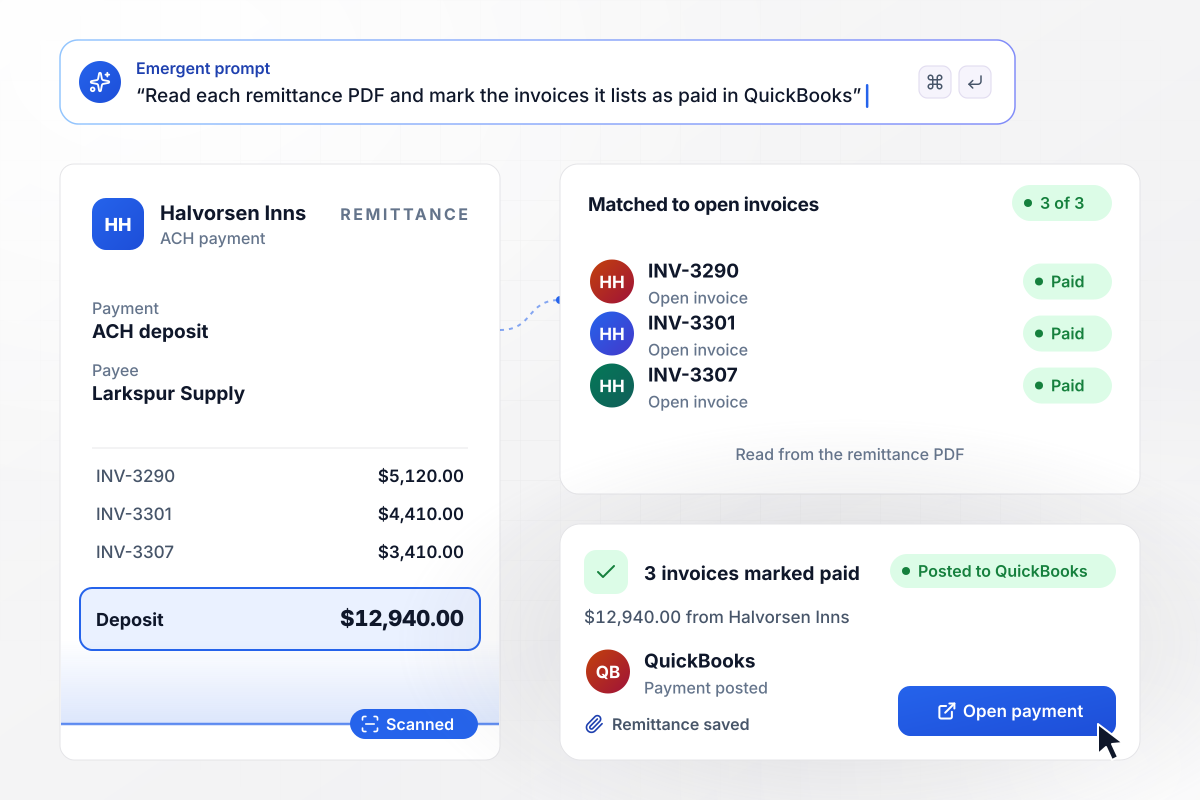
Three invoices closed by one deposit
A $12,940.00 ACH deposit lands from Halvorsen Inns with a remittance PDF attached. The app reads the PDF, finds INV-3290, INV-3301, and INV-3307 on it, and matches each line to its open invoice. All three are marked paid, and the payment posts to QuickBooks with the remittance saved beside it.
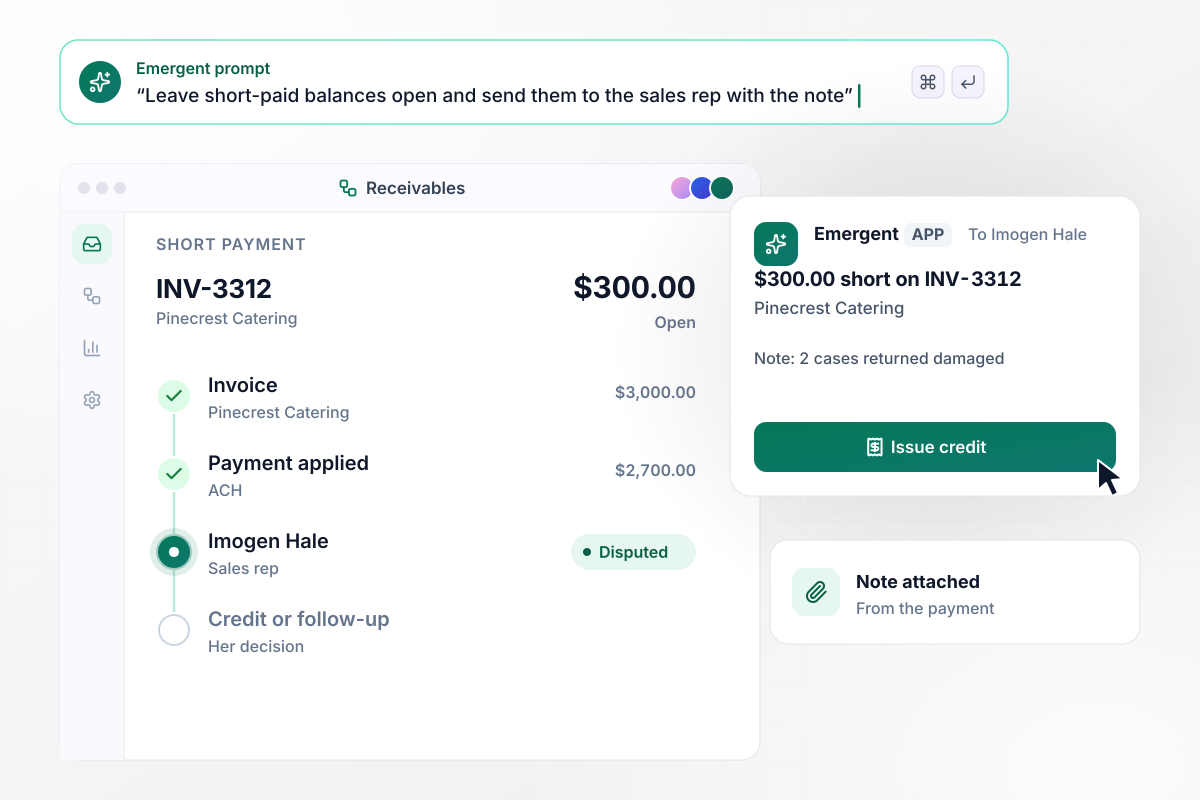
A $300 shortfall lands with the sales rep
Pinecrest Catering pays $2,700.00 against INV-3312, a $3,000.00 invoice, with a note: 2 cases returned damaged. The app applies the payment and leaves $300.00 open, tagged Disputed. Imogen Hale, the sales rep on the account, gets the balance with the note attached and decides on a credit or a follow-up.
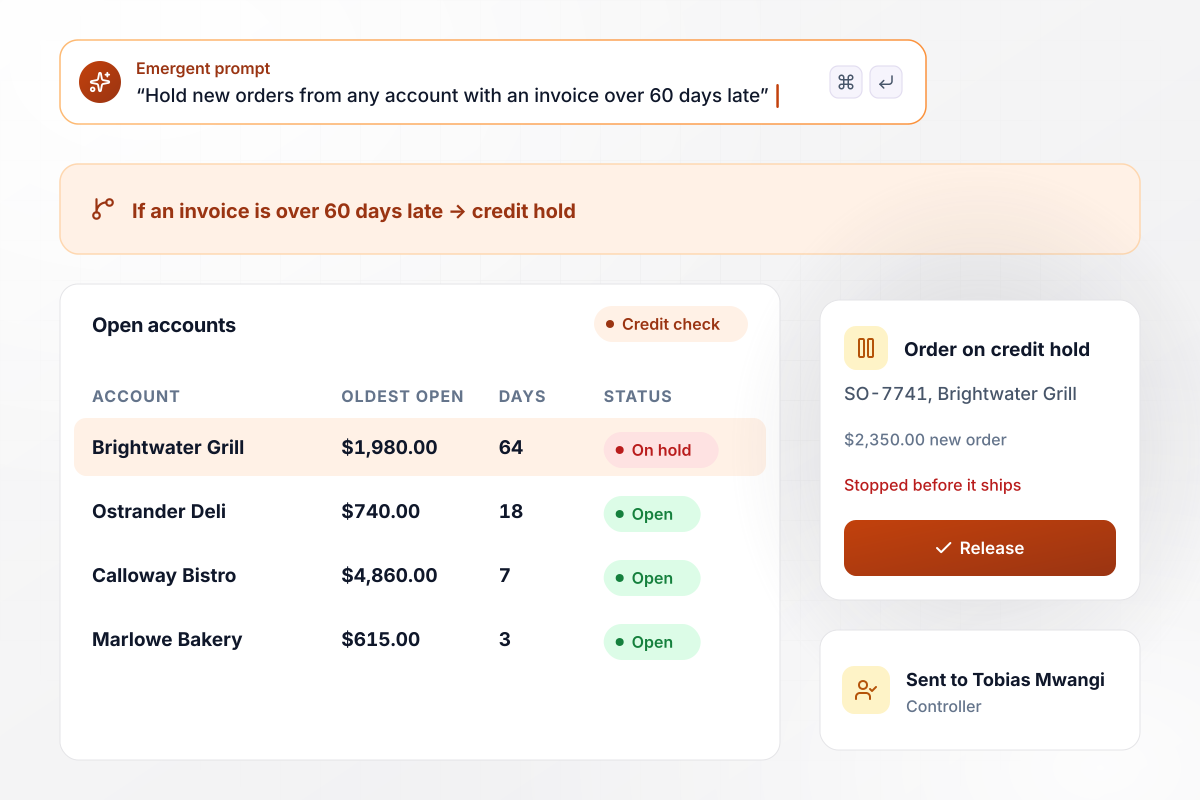
When an invoice passes 60 days, new orders wait
Brightwater Grill places order SO-7741 for $2,350.00 while its invoice INV-3204 for $1,980.00 is 64 days past due. Your rule puts any account with an invoice over 60 days late on credit hold. The order stops before it ships. Controller Tobias Mwangi sees both amounts in the app and decides whether it goes out.






How to Automate Accounts Receivable
Seven steps to plan accounts receivable automation around your aging report, then build and test it with Emergent.
Run your aging report and sort customers by how late their oldest invoice is. Note which accounts sit past 30 days and why: a missed reminder or a dispute nobody owns. That list sets the first jobs to automate.
Describe the schedule the way you would explain it to a new hire: one email 3 days before the due date, a second at 7 days late, a call after that. Emergent builds the app and its logic from those sentences.
Connect your accounting system and the inbox or bank feed where payments and remittances arrive, through their APIs. Keep the ledger as the record of each invoice, and have the app write every applied payment back to it.
Decide what counts as a match: the invoice number on the remittance, the exact amount, or both. A payment that fits no open invoice should land in a queue with the deposit and the remittance side by side.
Name one person for each kind of exception. Short payments go to the sales rep who knows the customer, held orders go to the controller, and unmatched deposits go to whoever applies cash today.
Pick last month's payments and run them through before the app touches a live account. Check each match against what your team posted by hand, fix a rule by prompting, and run the month again until the two agree.
Switch on the reminder schedule before the matching rules, since an email changes no balance. Watch the aging report for 30 days, compare the past-due total with the month before, then turn on the next automation.
Why Build AR Automation With Emergent?
Emergent builds the reminders and the matching as one app on a database you own, and it keeps running at month-end with no task cap.

|
Zapier | Make (Integromat) | n8n | |
|---|---|---|---|---|
| How you build | Prompt for the workflow and the app around it | Templates and editor, AI copilot | Visual canvas | Visual canvas, self-hosted or cloud |
| What you get | Workflow + trigger form + database + dashboard, as code you own | Zaps, plus Tables and Interfaces inside Zapier | Scenarios inside Make | Workflows inside n8n |
| Behavior at cap | Keeps running, no task cap | Overage billed at up to 1.25× the base rate | Runs pause | Cloud workflows stop until the reset or an upgrade |
| AI and agent steps | Native, share the same credit pool | Priced by model tier, drawn from the task pool | AI modules cost variable credits | Bring your own model API key, billed by the provider |
| Code ownership | Full code export to GitHub on paid plans | None | None | Yes on Community Edition |




Pick the Pricing Plan That Works for You
Choose the plan that fits your building ambitions. From weekend projects to enterprise applications, we've got you covered.




Find the right workflow automation
for you and your business
Frequently Asked Questions
Your Questions, Answered
Don't change this element unless you know what you are doing
More things you can build
with Emergent









on Emergent today


