

Build Invoice Automation That Reads Bills and Sends Invoices
Build invoice automation that codes the vendor PDFs you receive and drafts client invoices from logged hours.
Build invoice automation that reads vendor PDFs from my AP inbox and bills my clients from tracked hours.
Trusted by Builders Worldwide
Active Builders Worldwide
Apps Successfully Created
Countries Globally Reached



What Invoice Automation Has to Handle
The first three keep a bad bill out of your ledger. The other three carry invoice automation past the send button.
Field extraction with a review queue
Each PDF or scan is read into vendor, invoice number, dates, PO number, and line items. A field the model is unsure of goes to a review queue, not straight to the ledger.
Duplicate checks before anything posts
A resent PDF under a new filename is held, and the first copy stays the bill of record. The check compares number, amount and date against everything that vendor has billed before.
GL coding line by line
GL accounts and cost centers come from how that vendor's lines were coded before. When finance codes a new item by hand, the app reuses that choice on the vendor's next invoice.
Numbered and filed before sending
Outgoing invoices take the next number in your sequence, and no number is ever issued twice. Each invoice is saved as a PDF and a database row before anyone on the team sends it.
Sent with a payment link
Customers get each invoice by email with a Stripe payment link, or one from the processor you connect. Until it is paid, the invoice stays on the dashboard's unpaid list.
A codebase your engineer can extend
The app's code exports to your GitHub on paid plans. If a client wants its own invoice format or a second company joins the books, an engineer edits it there or you prompt Emergent.
Invoice Workflows Teams Build First
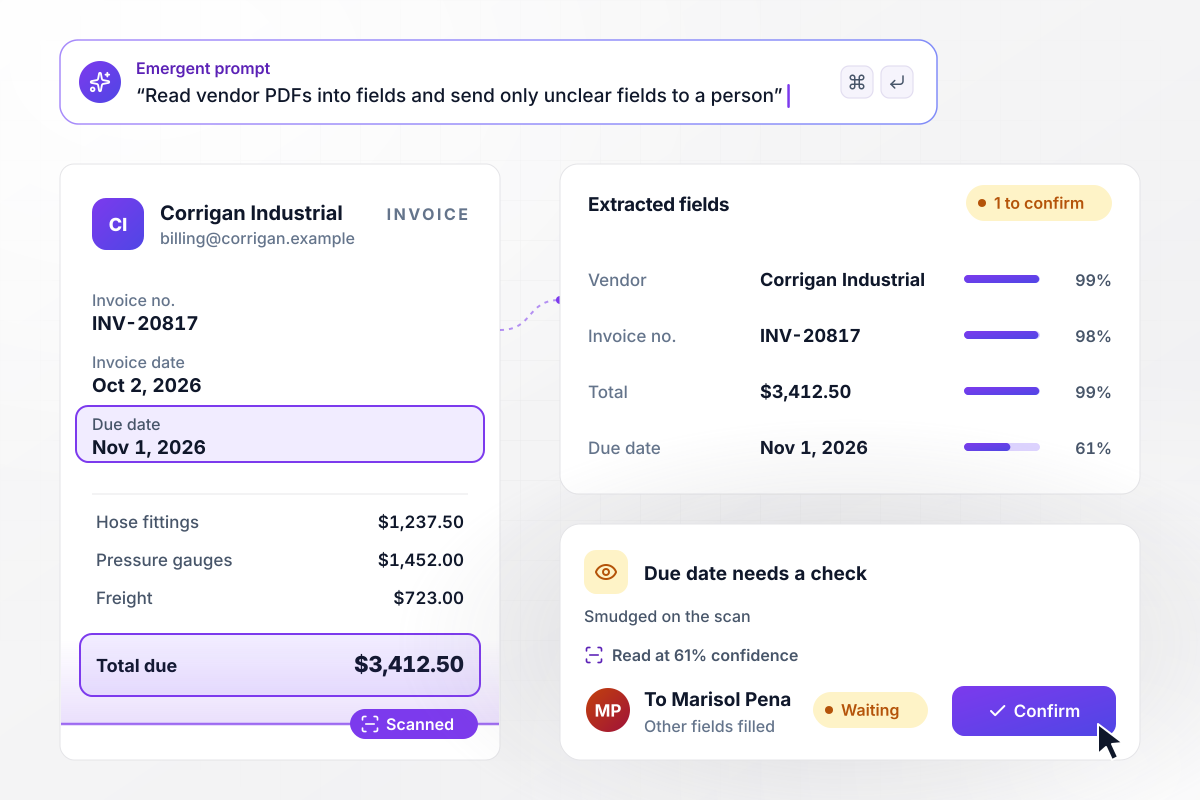
One bill record per PDF, with unsure fields held
Corrigan Industrial emails INV-20817 to the AP inbox at $3,412.50, and the due date sits under a smudge on the scan. That one field waits for Marisol Pena to confirm, and every other field is already filled.
window.awbMockup = { emailedPdfs: "Build invoice automation for my AP inbox. Read every vendor PDF into vendor, invoice number, invoice date, due date, line items, and total. When a field is hard to read, like a smudged due date, send only that field to Marisol Pena to confirm and fill in the rest. Save each invoice as a bill record with the PDF attached.", glCodingByLine: "Build a coding step for my supplier invoices. Give each line the GL account that the same item from that vendor was coded to before. When an item has never been bought from that vendor, send the line to Rafe Delmonte in finance to pick an account, and post the coded bill to Xero once every line has one.", timesheetInvoices: "Build automated invoicing for my agency. On the 1st of each month, turn the hours logged against each client into one draft invoice at that client's hourly rate. Show me all the drafts in one list to approve, then email each invoice with a Stripe payment link and record it in Xero.", fieldServiceJobs: "Build invoicing for my plumbing business. When a technician marks a job complete on their phone, create an invoice from the labor hours and parts on that job, email it to the customer with a payment link, and attach the PDF to the job record so the office can see it." };
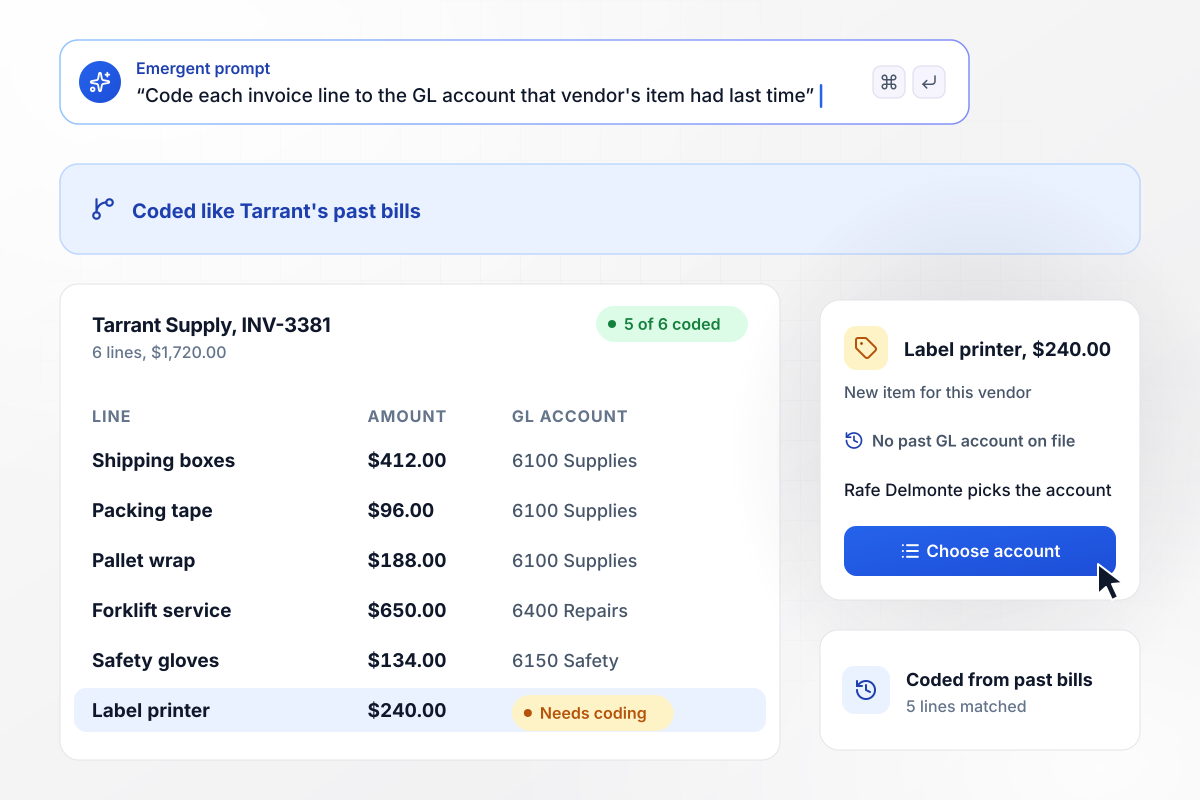
Five lines coded on arrival, one left for finance
On Tarrant Supply's INV-3381, five of six lines arrive coded like Tarrant's past bills. Shipping boxes go to 6100 Supplies and the forklift service to 6400 Repairs. The label printer, $240.00, has no history with this vendor. Rafe Delmonte picks its account.
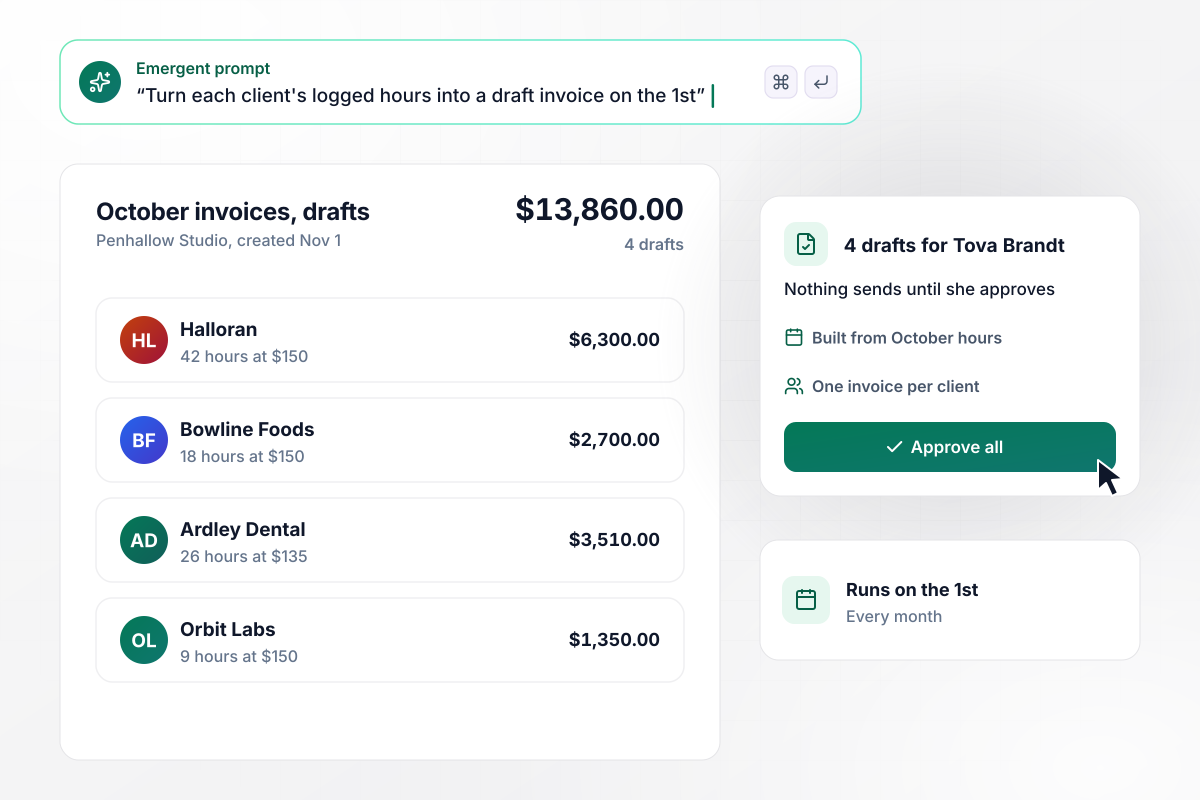
Billable hours become client invoices on the 1st
Hours logged against each client in October turn into one draft invoice per client on Nov 1. Halloran's draft comes to $6,300.00, for 42 hours at $150. Tova Brandt reviews the four drafts in one list, and nothing goes out until she approves.
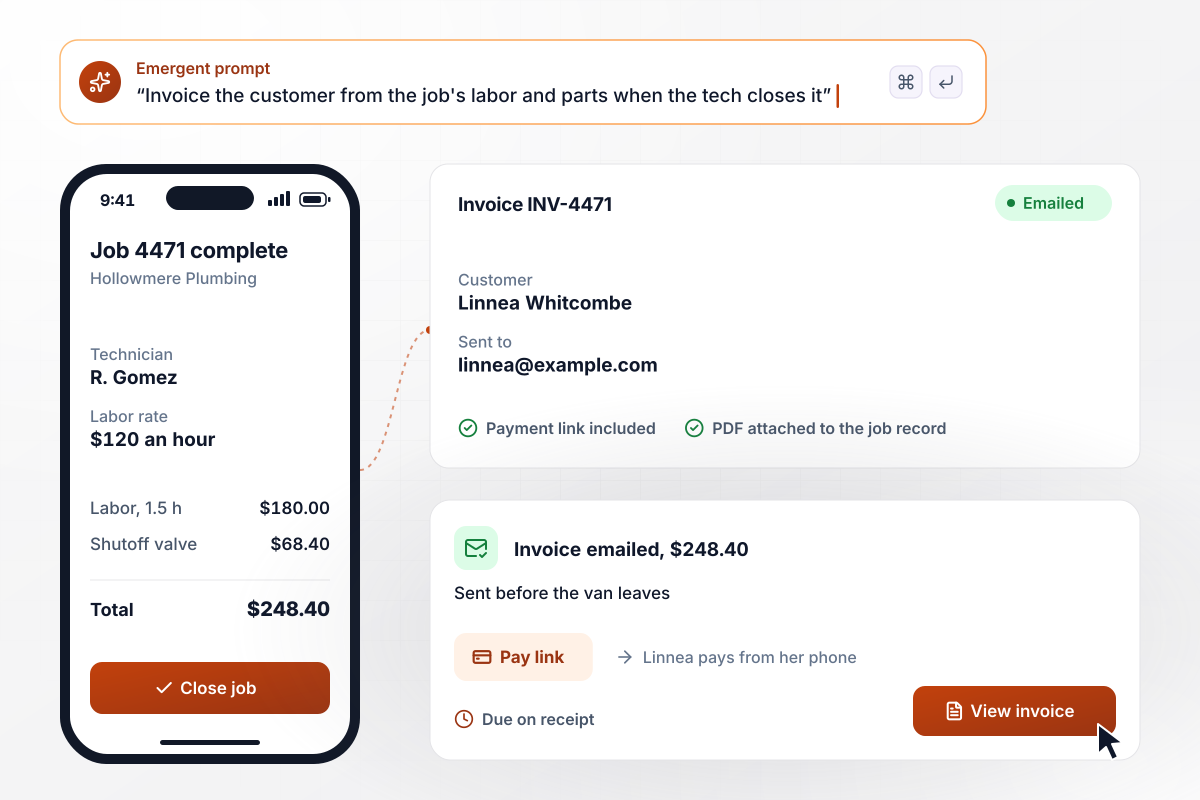
The customer has the invoice before the van leaves
A technician closes the job on a phone, and the labor and parts on it become an invoice. Job 4471 bills 1.5 hours at $120 and a $68.40 shutoff valve, $248.40 in all. Linnea Whitcombe pays from her phone, and the PDF stays attached to the job record.






How to Automate Invoice Processing
Seven steps to set up invoice automation that codes incoming bills and sends the invoices you issue.
Pull twenty invoices you received last month and five you sent. Include the hard ones, like a scan with a stamp across the total or a two-page PDF. These samples show Emergent what the app has to read and what your own invoices look like.
Tell Emergent what a finished bill record holds and which values a person must see before it posts, for example any total over $10,000 or a vendor seen for the first time. Anything that reads cleanly and stays under those limits goes straight through.
Connect the inbox vendors already email; nobody outside has to change a habit. For invoices you send, connect wherever billable work is recorded: a timesheet tool, a field service app, or Stripe orders. Emergent builds a sync for each one through its API.
Export last year's bills, with their GL accounts, from your accounting system and hand the file to Emergent. Regular vendors then start the first month with a coding history instead of an empty one.
Give Emergent your current invoice PDF and mark what should change, say a new logo or net 15 instead of net 30. Every invoice the app sends follows that template.
Bills you receive post with their GL codes and the source PDF attached. Invoices you send post as receivables under the customer's name, and your accountant closes the month in the same ledger as before.
Turn on outgoing invoices for one billing cycle and check the month's total against the records you connected in step 3. Once the numbers agree, point the AP inbox at the app and let incoming bills follow.
Why Build Invoice Automation With Emergent?
Bills in and invoices out share one database in the app Emergent builds. A customer who also bills you is one record, not two.

|
Rossum | Rillion | Basware | |
|---|---|---|---|---|
| How you build | Prompt for your AP process and the app around it | Self-serve free trial, then a quote-based contract | Demo-led; onboarding team connects your ERP | Sales-led implementation by Basware or a partner |
| What you get | Intake, matching, approvals, payment runs, and ledger, as code you own | Cloud AI document processing that writes to the ERP | Cloud AP platform for invoice capture and approvals | Cloud AP automation with an e-invoicing network |
| Pricing model | Credits, free to start | Annual plans priced on page volume; extra pages billed | Quote-based on invoice volume, unlimited users | Quote-based subscription, built from chosen modules |
| Code ownership | Full code export to GitHub on paid plans | None | None | None |




Pick the Pricing Plan That Works for You
Choose the plan that fits your building ambitions. From weekend projects to enterprise applications, we've got you covered.




Find the right workflow automation
for you and your business
Frequently Asked Questions
Your Questions, Answered
Don't change this element unless you know what you are doing
More things you can build
with Emergent









on Emergent today


