

Build a Course Evaluation Survey for Every Course You Teach
Build a course evaluation survey that rates each module, flags low scores, and saves every answer to a database you own.
Build a course evaluation survey that collects every answer in a database I own.
Trusted by Builders Worldwide
Active Builders Worldwide
Apps Successfully Created
Countries Globally Reached



Inside a Course Evaluation Survey on Emergent
Describe the course and who reads the results. Emergent builds each piece below, and a follow-up prompt changes any of them.
Questions for each part of the course
Name the modules, sessions, or lessons your course runs. Emergent drafts a rating question and a comment question for each part, and one more sentence rewords any of them.
Every answer tagged by course and cohort
Each answer is saved as a row in a database you own, with the course, cohort, and date on it. Set this cohort's module scores beside the last one before you plan the next run.
An email when a rating falls to 1 or 2
A rating of 1 or 2 sends the instructor an email with the student's comment beside it, while the lesson is fresh. Slack alerts work too, and the whole class gets one reminder.
One question per screen on a phone
Students scan the code on your last slide and answer one question per screen on a phone, before they pack up. No response cap applies, whether 12 students answer or 1,200 do.
Linked to your course platform
Connect the survey to your course platform or any tool with an API. The app sends the link when a student finishes the last lesson and keeps the answers apart from names.
Your domain and your code
Publish the survey on your own domain: custom domains are included and use credits. On paid plans, Emergent exports the full code to your GitHub repository for a developer to extend.
What Four Course Evaluations Changed
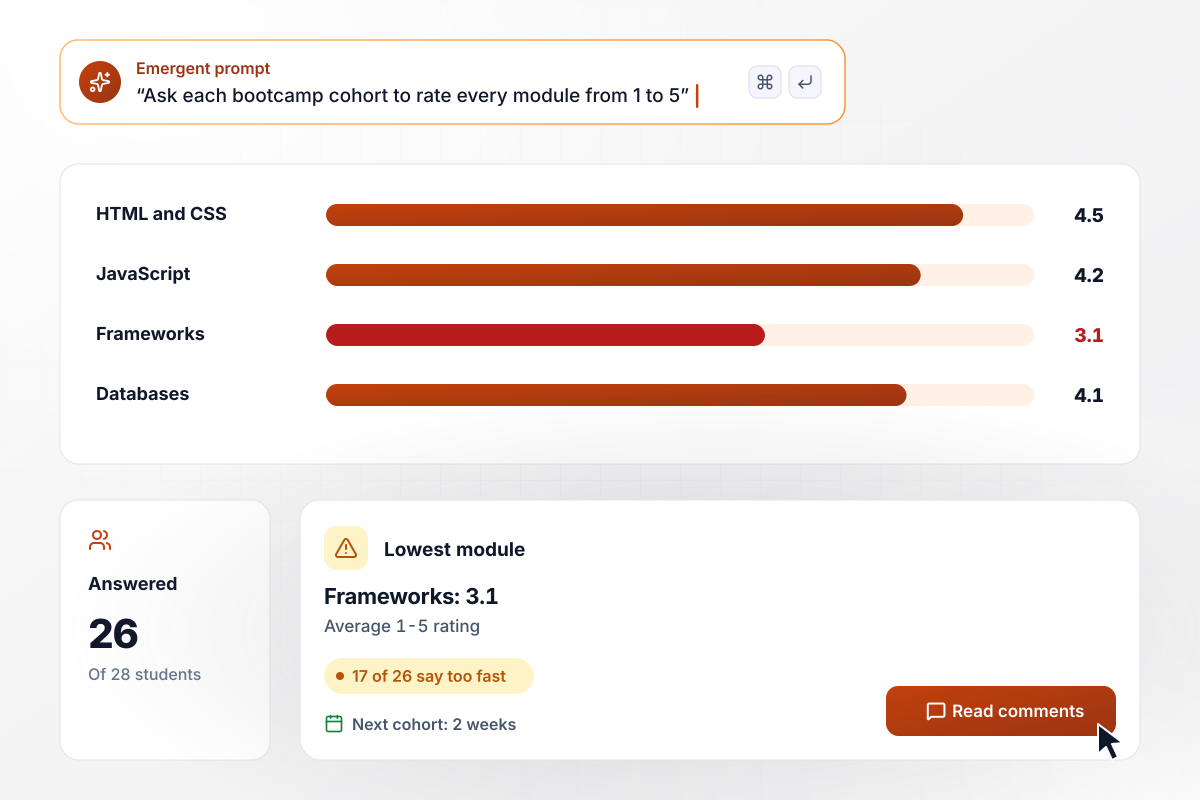
The frameworks module ran too fast for 17 of 26 students
Quenby Code School asks each bootcamp cohort to rate every module on a 1-5 scale on the last day. Of 28 spring students, 26 answered. HTML and CSS averaged 4.5, JavaScript 4.2, and databases 4.1. Frameworks scored 3.1, and 17 of the 26 called its pace too fast. The next cohort gets 2 weeks on it.
window.awbMockup = { bootcampModules: "My coding bootcamp wants a course evaluation for the last day of each cohort. Ask students to rate every module from 1 to 5: HTML and CSS, JavaScript, frameworks, and databases. Add a question on whether each module's pace was too slow, about right, or too fast. Show the average per module on a dashboard and flag the lowest one.", studioWorkshops: "I run a 6-week wheel throwing course at my clay studio. Build a short survey that opens from a QR code on a phone and shows one question per screen. Ask which session needs more time: centering, trimming, or glazing. Show how many students picked each option and how many answered out of the class.", selfPacedCourses: "I sell a self-paced bookkeeping course. Send a course evaluation when a student finishes the last lesson. Ask for a 1 to 5 rating of the course and which lesson was hardest to follow. Email me any rating of 1 or 2 with the comment, and save every answer with the finish month.", clientTraining: "My training company teaches a 2-day project management course at client companies. Build an evaluation that tags every answer with the client. Ask trainees to rate the course and the case studies from 1 to 5, with a comment box. Show a table of answers and case study scores by client, and flag any client below 3." };
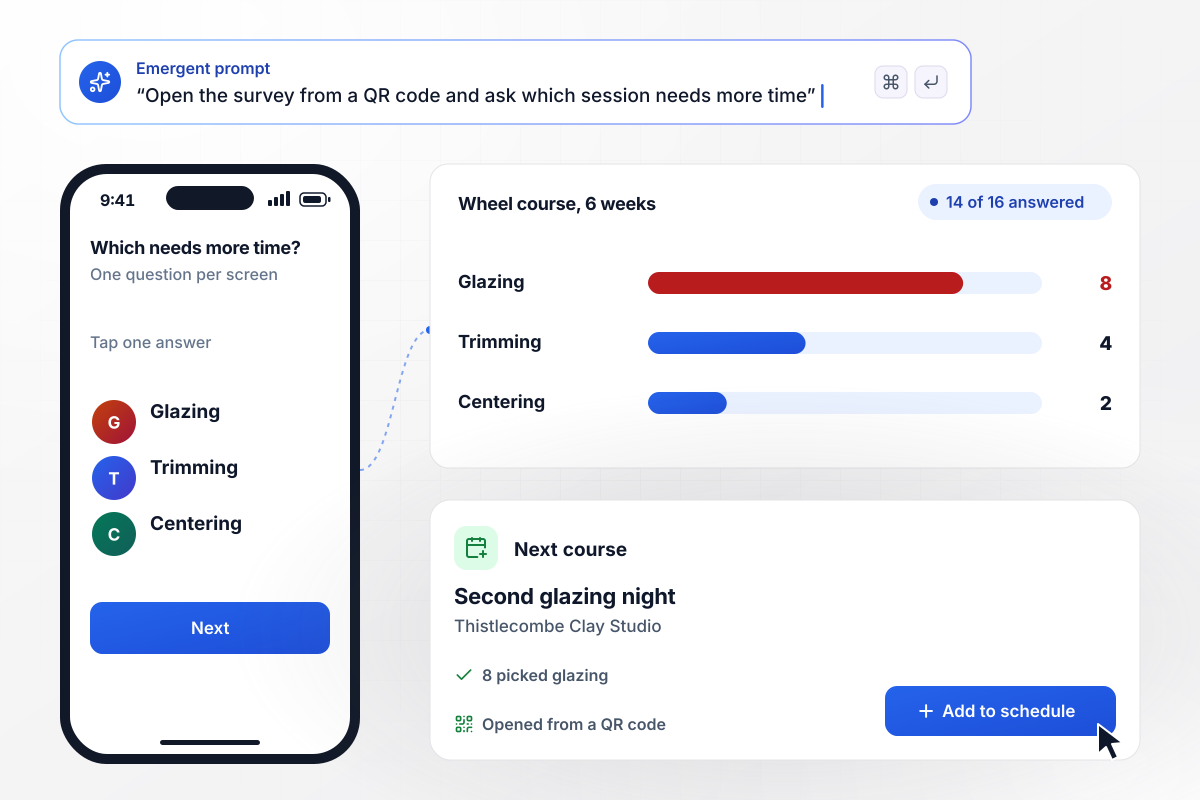
Glazing wins 8 of 14 votes and a second night
On the last night of its 6-week wheel course, Thistlecombe Clay Studio tapes a QR code by the kilns. The survey opens on each phone, one question per screen. Of 16 students, 14 said which session needs more time: 8 picked glazing, 4 trimming, and 2 centering. The next course adds a second glazing night.
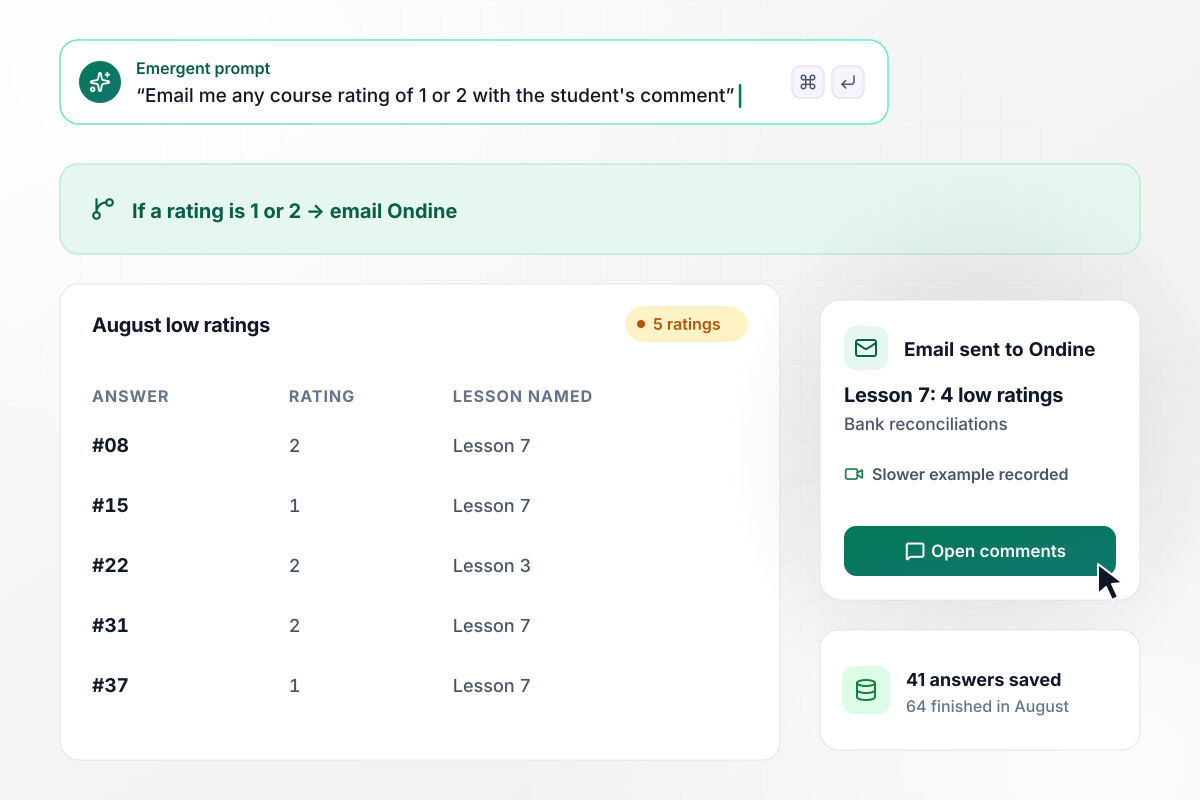
Lesson 7 is re-recorded after it draws 4 of 5 low ratings
Ondine Pryor's self-paced bookkeeping course opens the evaluation once a student completes the final lesson. Of 64 August finishers, 41 answered. Any rating of 1 or 2 emails Ondine with the comment. August brought 5, and 4 named lesson 7 on bank reconciliations. She re-recorded it around a slower worked example.
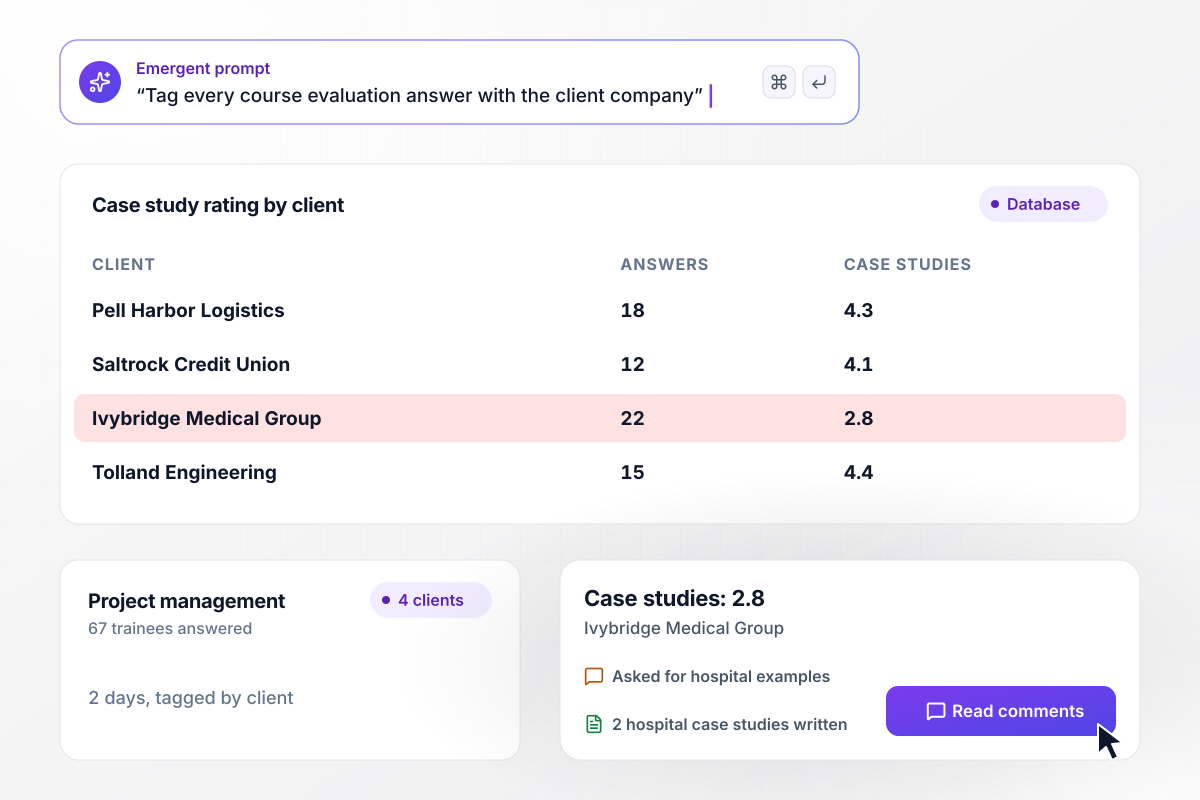
One of 4 clients scores the case studies 2.8
Larkhaven Training runs a 2-day project management course for client companies and tags answers by client. Across 4 clients, 67 trainees answered. Three rated the case studies 4.1 to 4.4. Ivybridge Medical Group rated them 2.8 and asked for hospital examples. Larkhaven wrote 2 before Ivybridge's next cohort.






How to Create a Course Evaluation Survey
Seven steps to plan a course evaluation survey, build it with Emergent, and turn the lowest score into a change for the next run.
Decide what the answers could change before the next run, such as a module to lengthen or a lesson to re-record. Write that in the first line of your prompt to Emergent. Cut any question whose answer could not move that decision.
List each module or session, then add the materials, the pace, and the workload. Rate every one on the same 1-5 scale, so a weak part stands out against the rest and against the previous cohort's scores.
Tell Emergent the course name, its parts, who answers, and who reads the results. Emergent builds the survey and a results dashboard from that description. Ask for any change in one more sentence, such as a new module or a reworded question.
Close with two optional questions: what should stay exactly as it is, and what should change next time. A rating tells you where a course is weak. The comments tell you what to do about it, in the students' own words.
Send the link to 2 people who took the course before and ask them to answer on a phone. Watch for a question they read two ways or a module name they do not recognize, and fix it before launch.
Run the survey during the final session instead of emailing it a week later. UW-Madison's assessment office suggests giving students 10-15 minutes of class time to complete it. Send everyone one reminder after that.
When the survey closes, compare each part's score with the last run and pick one change to make. On day one of the next run, tell students what earlier students asked for and what you changed because of it.
Why Emergent for a Course Evaluation Survey?
One survey app covers every course and cohort you run, and no response cap applies when every class ends in the same week.

|
SurveyMonkey | Microsoft Forms | SurveyHero | |
|---|---|---|---|---|
| What you get | Survey, logic, and response database, as code you own | Survey builder with templates, including employee engagement | Surveys, quizzes, and polls with response summaries | Survey builder with templates, including employee satisfaction |
| Pricing model | Credits, no response caps or per-response fees | Per-user team plans with a seat minimum, billed annually | Free with a Microsoft account; included in Microsoft work and school subscriptions | Free plan, then per-account plans with unlimited responses |
| Where responses live | A database table you own, plus any integration | SurveyMonkey account | Microsoft Forms, with export to Excel | SurveyHero account, EU data centers |
| Code ownership | Full code export to GitHub on paid plans | None | None | None |


Pick the Pricing Plan That Works for You
Choose the plan that fits your building ambitions. From weekend projects to enterprise applications, we've got you covered.




Find the right survey, quiz, or poll
for your team
Frequently Asked Questions
Your Questions, Answered
Don't change this element unless you know what you are doing
More things you can build
with Emergent









on Emergent today


