

Build a Win Loss Survey and Learn Why Deals Were Won or Lost
Build a win loss survey that goes out when a deal closes, asks the buyer why, and saves each answer to a database you own.
Build a win loss survey that collects every answer in a database I own.
Trusted by Builders Worldwide
Active Builders Worldwide
Apps Successfully Created
Countries Globally Reached



What Emergent Builds Into Your Win Loss Survey
The survey a buyer sees after a deal closes, and what happens to their answers once they submit.
Questions drafted from how you sell
Describe what you sell, who buys it, and the vendors you lose to. Emergent drafts the survey and its logic from that prompt, and a follow-up prompt changes any question.
Sent when the deal closes in your CRM
The app connects to your CRM through its API. When a deal moves to closed won or closed lost, the buyer gets the survey, and the answers come back tied to that deal.
Separate paths for won and lost buyers
A buyer who chose you is asked what tipped the decision. A buyer who went elsewhere is asked which vendor won and why. Nobody sees questions meant for the other side.
A short survey, one screen at a time
Buyers answer one question per screen, so a ranking of five reasons and an open text box never crowd one phone screen. The buyer only reads the question in front of them.
Hard losses go to a named person
Set a rule for the losses you want to hear about first, such as large deals. The app emails those answers to the person you choose, or sends them a Slack direct message.
Answers stored with the deal
Each answer is a row in a database you own, with the deal, its value, the outcome, and the date. Responses have no cap, and paid plans export the full code to GitHub.
What Four Sales Teams Learned
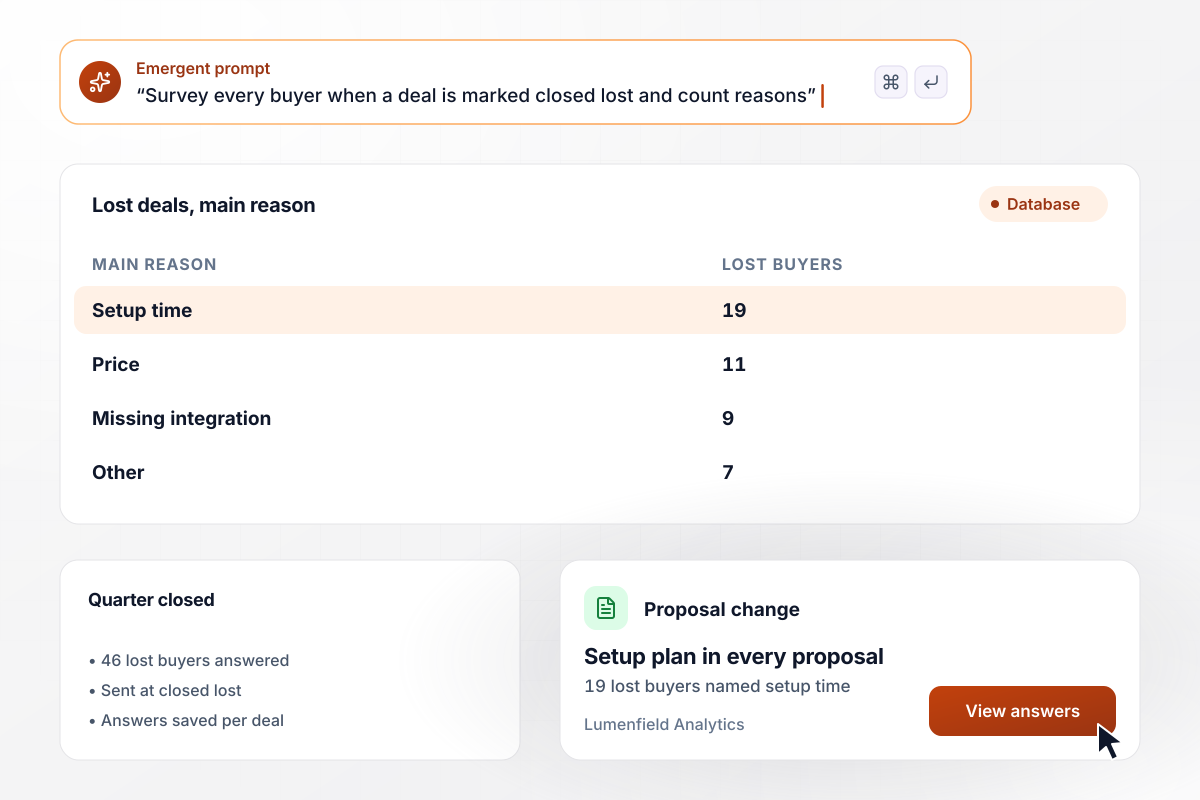
19 lost deals with one reason: setup time
Lumenfield Analytics sends a short survey whenever a deal is marked closed lost in its CRM. Last quarter, 46 lost buyers answered. Setup time was the main reason for 19 of them, ahead of price at 11 and a missing integration at 9, with 7 giving other reasons. Lumenfield now puts a setup plan in every proposal.
window.awbMockup = { lostDealReasons: "Build a win loss survey for my analytics software company. When a deal is marked closed lost in our CRM, send the buyer a short survey that asks the main reason they chose another vendor: setup time, price, a missing integration, or other. Save every answer with the deal and show me the count for each reason.", wonDealRanking: "Create a survey for buyers who chose our freight routing software. Ask them to rank five reasons for the decision: fit with their dispatch system, price, onboarding, support, and the sales demo. Show me how many buyers put each reason first.", largeLossAlert: "Build a win loss survey for my solar installation company. When a lost bid is over $40,000, email the buyer's answers to Coralie, our sales director, with the bid value and the installer the buyer picked. Save every answer with the bid.", interviewRequest: "Build a win loss survey for my HR software company that goes to won and lost buyers. End it by asking whether the buyer would take a 20-minute call. Put everyone who says yes on a call list for our product marketing team, with their answers." };
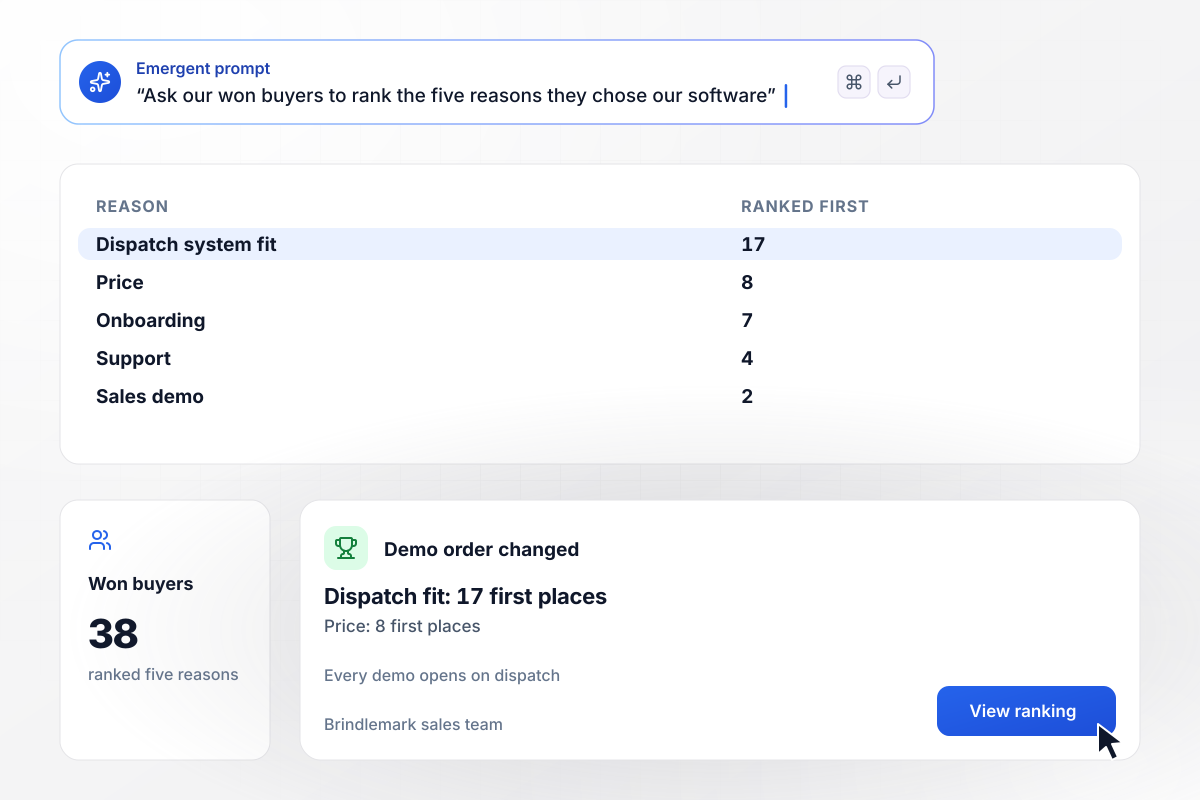
For 17 won buyers, dispatch fit came first
Brindlemark asked 38 buyers who chose its freight routing software to rank five reasons for the decision. Fit with their dispatch system came first for 17 of them, and price came first for 8. The sales team now opens every demo with the dispatch connection instead of the price sheet.
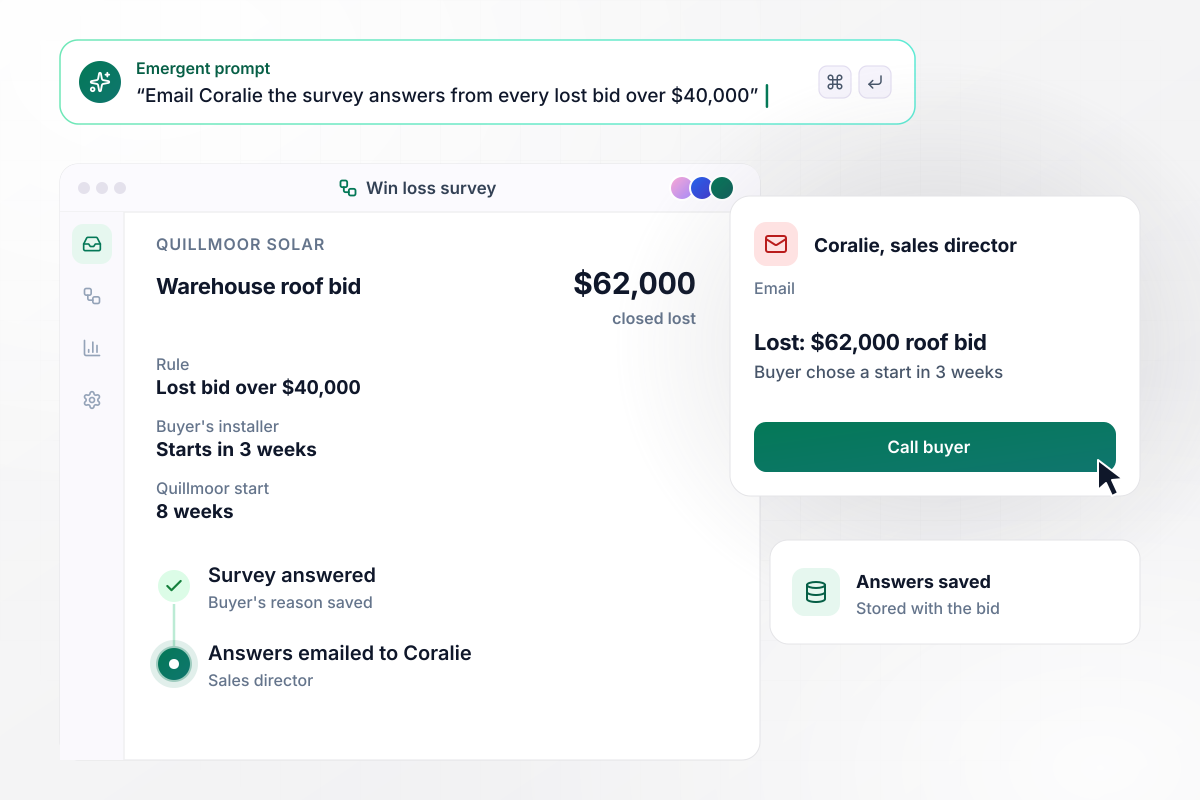
When a bid over $40,000 is lost, Coralie gets the answers
Quillmoor Solar emails the survey answers from every lost bid over $40,000 to Coralie, its sales director. A $62,000 warehouse roof bid came back lost: the buyer picked an installer who could start in 3 weeks, against Quillmoor's 8. Coralie called the buyer the next morning.
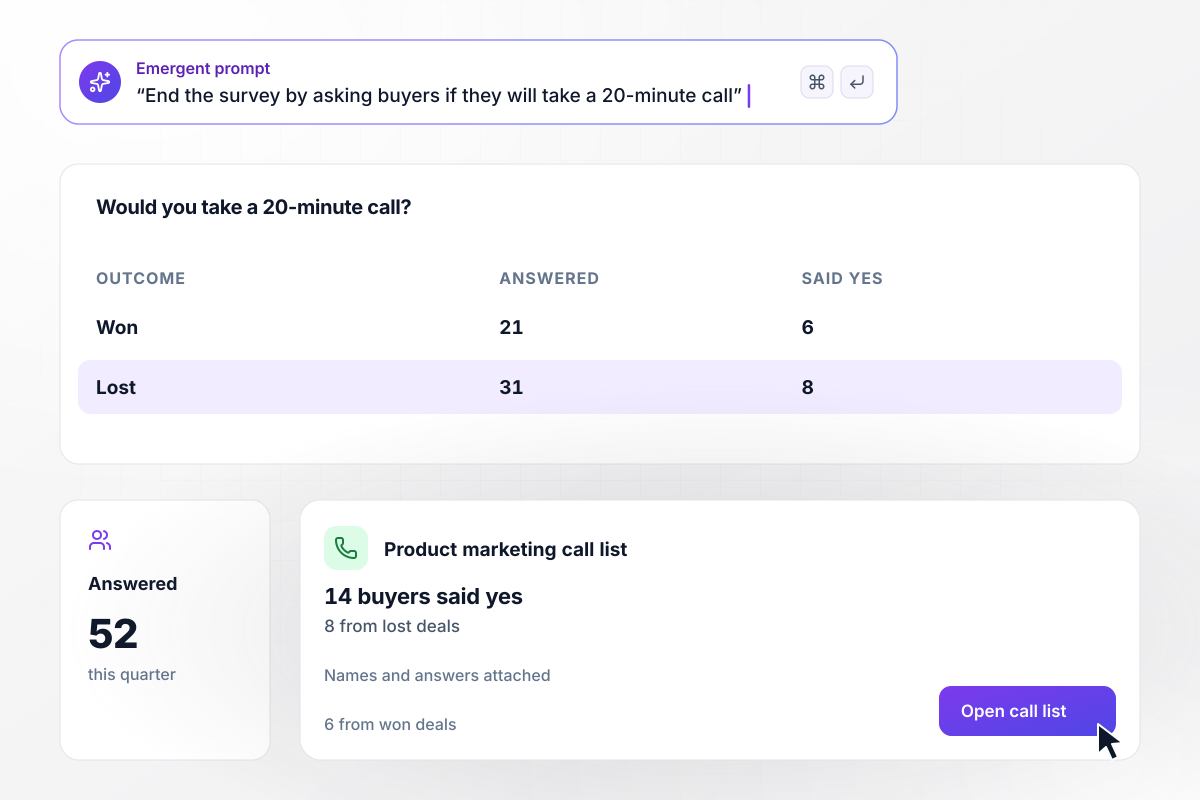
14 of 52 buyers agree to a call
Tarnwick Labs ends its survey by asking whether the buyer would take a 20-minute call. Of the 52 buyers who answered this quarter, 21 won and 31 lost, 14 said yes, and 8 of those came from lost deals. Their names and answers go onto the product marketing team's call list.






How to Create a Win Loss Survey
Seven steps to create a win loss survey that shows why buyers chose you or went elsewhere, then build it with Emergent.
Pick the decisions the survey will feed, such as the demo script or the proposal template. Write down two or three goals, and cut any question that serves none of them.
Send it to won and lost deals alike. The comparison between the two groups is the point. If you close a lot of small deals, set a floor by deal value and keep it the same all quarter.
Forrester advises win/loss surveys of less than 5 minutes. Its suggested format is ranking questions on capabilities, pricing, sales effectiveness, and company sentiment, plus one open-ended question.
Ask won buyers what tipped the decision. Ask lost buyers which vendor they chose and the main reason. Give each reason list an Other option with a text box for anything you missed.
Send the survey within days of the decision, while the buyer still remembers the details. Tie it to the deal stage in your CRM, and send it under the sales rep's name, not a no-reply address.
Before the full send, run the survey on three recent deals, two lost and one won. Check that each buyer sees only their own path and that every answer lands next to the right deal.
Tally the main reasons once a quarter and compare them with the last one. Change one thing at a time, such as the proposal, and let the next quarter's answers show whether it worked.
Why Build Your Win Loss Survey With Emergent?
Every answer stays tied to its deal, in a database you own. A new question for lost buyers takes one more prompt.

|
SurveyMonkey | Microsoft Forms | SurveyHero | |
|---|---|---|---|---|
| What you get | Survey, logic, and response database, as code you own | Survey builder with templates, including employee engagement | Surveys, quizzes, and polls with response summaries | Survey builder with templates, including employee satisfaction |
| Pricing model | Credits, no response caps or per-response fees | Per-user team plans with a seat minimum, billed annually | Free with a Microsoft account; included in Microsoft work and school subscriptions | Free plan, then per-account plans with unlimited responses |
| Where responses live | A database table you own, plus any integration | SurveyMonkey account | Microsoft Forms, with export to Excel | SurveyHero account, EU data centers |
| Code ownership | Full code export to GitHub on paid plans | None | None | None |


Pick the Pricing Plan That Works for You
Choose the plan that fits your building ambitions. From weekend projects to enterprise applications, we've got you covered.




Find the right survey, quiz, or poll
for your team
Frequently Asked Questions
Your Questions, Answered
Don't change this element unless you know what you are doing
More things you can build
with Emergent









on Emergent today


